
🔗 Introduction: From RAG to Foundation
“If RAG is how intelligent systems respond, semantic search is how they understand.”
In our last post, we explored how Retrieval-Augmented Generation (RAG) unlocked the ability for AI systems to answer questions in rich, fluent, contextual language. But how do these systems decide what information even matters?
That’s where semantic search steps in.
Semantic search is the unsung engine behind intelligent systems—helping GitHub Copilot generate 46% of developer code, Shopify drive 700+ orders in 90 days, and healthcare platforms like Tempus AI match patients to life-saving treatments. It doesn’t just find “words”—it finds meaning.
This post goes beyond the buzz. We’ll show what real semantic search looks like in 2025:
- Architectures that power enterprise copilots and recommendation systems.
- Tools and best practices that go beyond vector search hype.
- Lessons from real deployments—from legal tech to e-commerce to support automation.
Just like RAG changed how we write answers, semantic search is changing how systems think. Let’s dive into the practical patterns shaping this transformation.
🧭 Why Keyword Search Fails, and Semantic Search Wins
Most search systems still rely on keyword matching—fast, simple, and well understood. But when relevance depends on meaning, not exact terms, this approach consistently breaks down.
Common Failure Modes
- Synonym blindness: Searching for “doctoral candidates” misses pages indexed under “PhD students.”
- Multilingual mismatch: A support ticket in Spanish isn’t found by an English-only keyword query—even if translated equivalents exist.
- Overfitting to phrasing: Searching legal clauses for “terminate agreement” doesn’t return documents using “contract dissolution,” even if conceptually identical.
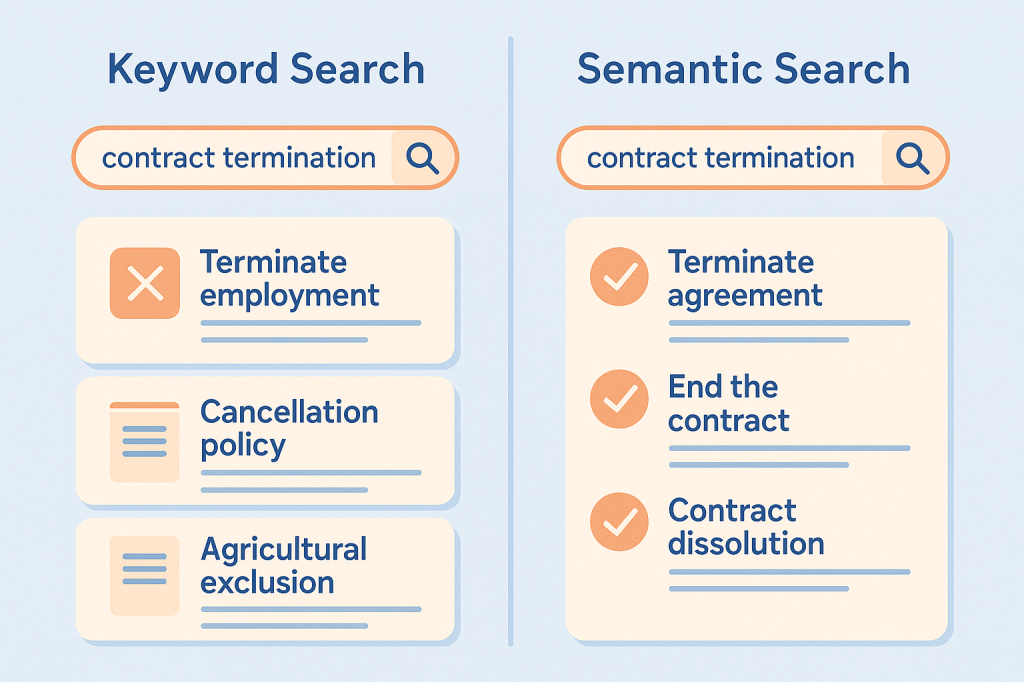
These aren’t edge cases—they’re systemic.
A 2024 benchmark study showed enterprises lose an average of $31,754 per employee per year due to inefficient internal search systemssemantic search claude. The gap is especially painful in:
- Customer support, where unresolved queries escalate due to missed knowledge base hits.
- Legal search, where clause discovery depends on phrasing, not legal equivalence.
- E-commerce, where product searches fail unless users mirror site taxonomy (“running shoes” vs. “sneakers”).
Semantic search addresses these issues by modeling similarity in meaning—not just words. But that doesn’t mean it always wins. The next section unpacks what it is, how it works, and when it actually makes sense to use.
🧠 What Is Semantic Search? A Practical Model
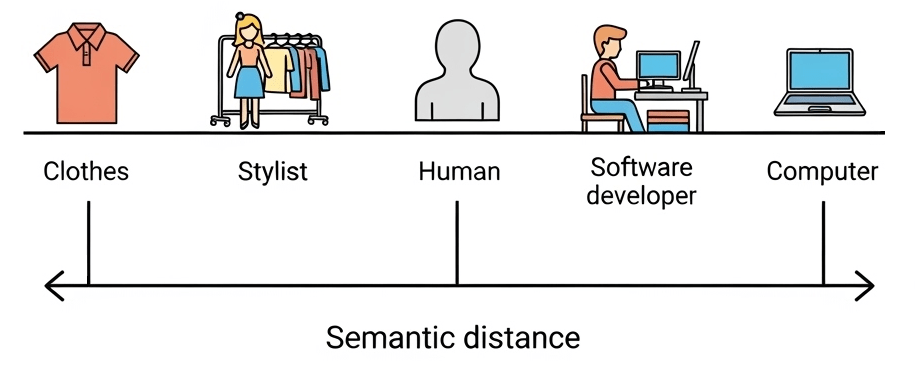
Semantic search retrieves information based on meaning, not surface words. It relies on transforming text into vectors—mathematical representations that cluster similar ideas together, regardless of how they’re phrased.
Lexical vs. Semantic: A Mental Model
Lexical search finds exact word matches.
Query: “laptop stand”
Misses: “notebook riser”, “portable desk support”
Semantic search maps all these terms into nearby positions in vector space.The system knows they mean similar things, even without shared words.
Core Components
- Embeddings: Text is encoded into a dense vector (e.g., 768 to 3072 dimensions), capturing semantic context.
- Similarity: Queries are compared to documents using cosine similarity or dot product.
- Hybrid Fusion: Combines lexical and semantic scores using techniques like Reciprocal Rank Fusion (RRF) or weighted ensembling.
Evolution of Approaches
| Stage | Description | When Used |
|---|---|---|
| Keyword-only | Classic full-text search | Simple filters, structured data |
| Vector-only | Embedding similarity, no text indexing | Small scale, fuzzy lookup |
| Hybrid Search | Combine lexical + semantic (RRF, CC) | Most production systems |
| RAG | Retrieve + generate with LLMs | Question answering, chatbots |
| Agentic Retrieval | Multi-step, context-aware, tool-using AI | Autonomous systems |
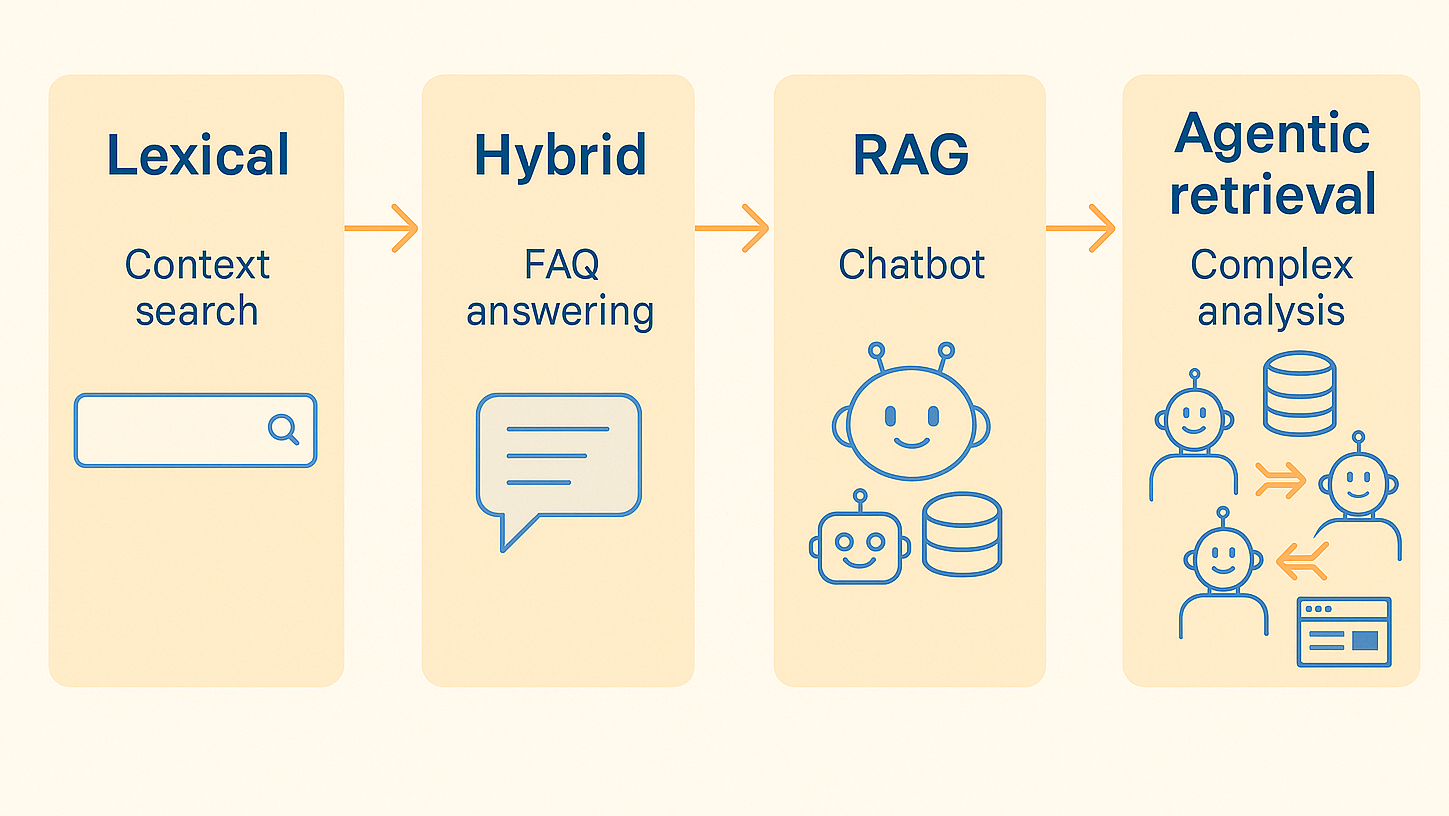
Semantic search isn’t just “vector lookup.” It’s a design pattern built from embeddings, retrieval logic, scoring strategies, and increasingly—reasoning modules.
🧱 Architectural Building Blocks and Best Practices
Designing a semantic search system means combining several moving parts into a cohesive pipeline—from turning text into vectors to returning ranked results. Below is a working blueprint.
Core Components: What Every System Needs
Let’s walk through the core flow:
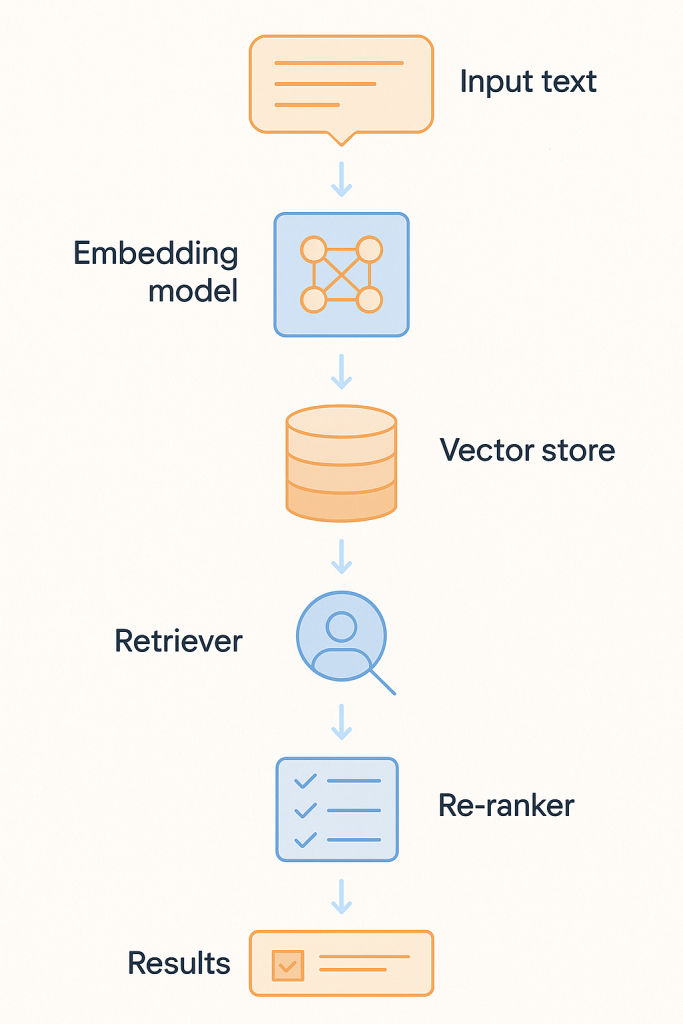
Embedding Layer
Converts queries and documents into dense vectors using a model like:
- OpenAI
text-embedding-3-large(plug-and-play, high quality) - Cohere v3 (multilingual)
- BGE-M3 or Mistral-E5 (open-source options)
Vector Store
Indexes embeddings for fast similarity search:
- Qdrant (ultra-low latency, good for filtering)
- Weaviate (multimodal, plug-in architecture)
- pgvector (PostgreSQL extension, ideal for small-scale or internal use)
Retriever Orchestration
Frameworks like:
- LangChain (fast prototyping, agent support)
- LlamaIndex (good for structured docs)
- Haystack (production-grade with observability)
Re-ranker (Precision Layer)
Refines top-N results from the retriever stage using more sophisticated logic:
- Cross-Encoder Models: Jointly score query+document pairs with higher accuracy
- Heuristic Scorers: Prioritize based on position, title match, freshness, or user profile
- Purpose: Suppress false positives and boost the most useful answers
- Often used with LLMs for re-ranking in RAG and legal search pipelines
Key Architectural Practices (with Real-World Lessons)
✅ Store embeddings alongside original text and metadata
→ Enables fallback keyword search, filterable results, and traceable audit trails.
Used in: Salesforce Einstein — supports semantic and lexical retrieval in enterprise CRM with user-specific filters.
✅ Log search-click feedback loops
→ Use post-click data to re-rank results over time.
Used in: Shopify — improved precision by learning actual user paths after product search.
✅ Use hybrid search as the default
→ Pure vector often retrieves plausible but irrelevant text.
Used in: Voiceflow AI — combining keyword match with embedding similarity reduced unresolved support cases by 35%.
✅ Re-evaluate embedding models every 3–6 months
→ Models degrade as usage context shifts.
Seen in: GitHub Copilot — regular retraining required as codebase evolves.
✅ Run offline re-ranking experiments
→ Don’t trust similarity scores blindly—test on real query-result pairs.
Used in: Harvey AI — false positives in legal Q&A dropped after introducing graph-based reranking layer.
🧩Use Case Patterns: Architectures by Purpose
Semantic search isn’t one-size-fits-all. Different problem domains call for different architectural patterns. Below is a compact guide to five proven setups, each aligned with a specific goal and backed by production examples.
| Pattern | Architecture | Real Case / Result |
|---|---|---|
| Enterprise Search | Hybrid search + user modeling | Salesforce Einstein: −50% click depth in internal CRM search |
| RAG-based Systems | Dense retriever + LLM generation | GitHub Copilot: 46% of developer code generated via contextual completion |
| Recommendation Engines | Vector similarity + collaborative signals | Shopify: 700+ orders in 90 days from semantic product search |
| Monitoring & Support | Real-time semantic + event ranking | Voiceflow AI: 35% drop in unresolved support tickets |
| Semantic ETL / Indexing | Auto-labeling + semantic clustering | Tempus AI: structure unstructured medical notes for retrieval across 20+ hospitals |
🧠 Enterprise Search
Employees often can’t find critical internal information—even when it exists. Hybrid systems help match queries to phrased variations, acronyms, and internal jargon.
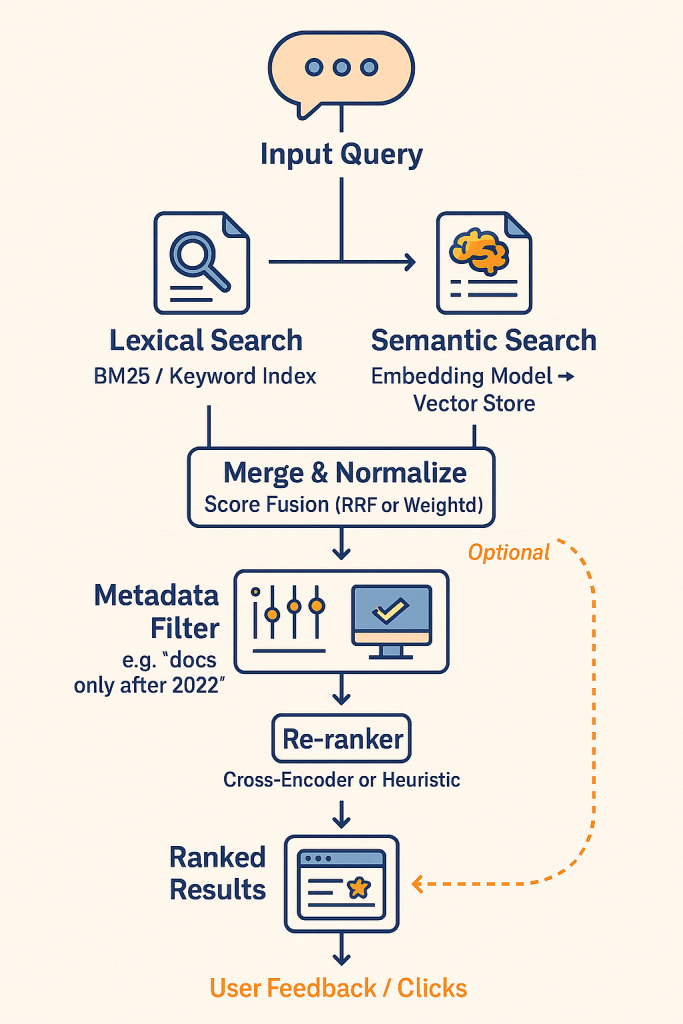
- Query: “Leads in NY Q2”
- Result: Finds “All active prospects in New York during second quarter,” even if phrased differently
- Example: Salesforce uses hybrid vector + text with user-specific filters (location, role, permissions)
💬 RAG-based Systems
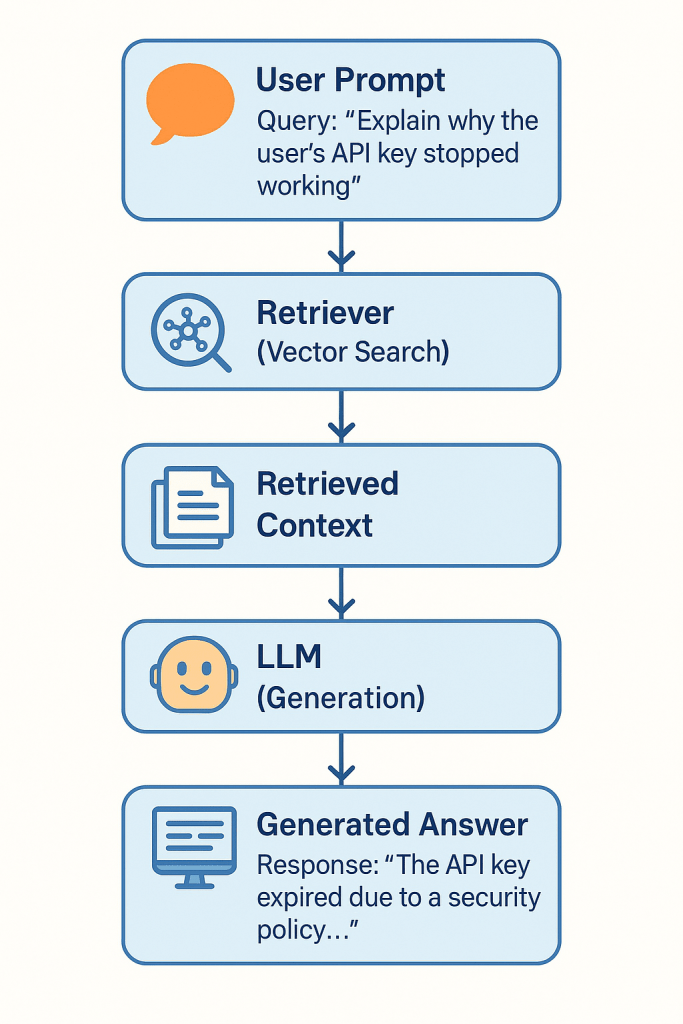
When search must become language generation, Retrieval-Augmented Generation (RAG) pipelines retrieve semantic matches and feed them into LLMs for synthesis.
- Query: “Explain why the user’s API key stopped working”
- System: Retrieves changelog, error logs → generates full explanation
- Example: GitHub Copilot uses embedding-powered retrieval across billions of code fragments to auto-generate dev suggestions.
🛒 Recommendation Engines
Semantic search improves discovery when users don’t know what to ask—or use unexpected phrasing.
- Query: “Gift ideas for someone who cooks”
- Matches: “chef knife,” “cast iron pan,” “Japanese cookbook”
- Example: Shopify’s implementation led to a direct sales lift—Rakuten saw a +5% GMS boost.
📞 Monitoring & Support
Support systems use semantic matching to find answers in ticket archives, help docs, or logs—even with vague or novel queries.
- Query: “My bot isn’t answering messages after midnight”
- Matches: archived incidents tagged with “off-hours bug”
- Example: Voiceflow AI reduced unresolved queries by 35% using real-time vector retrieval + fallback heuristics.
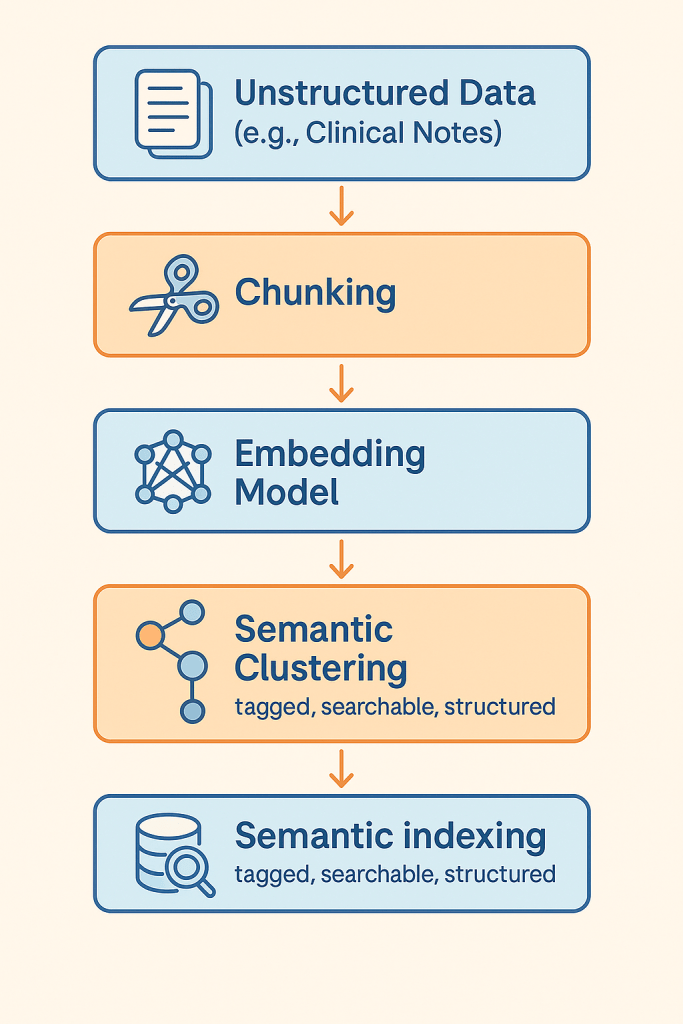
🧬 Semantic ETL / Indexing
Large unstructured corpora—e.g., medical notes, financial reports—can be semantically indexed to enable fast filtering and retrieval later.
- Source: Clinical notes, radiology reports
- Process: Auto-split, embed, cluster, label
- Example: Tempus AI created semantic indexes of medical data across 65 academic centers, powering search for treatment and diagnosis pathways.
🛠️ Tooling Guide: What to Choose and When
Choosing the right tool depends on scale, latency needs, domain complexity, and whether you’re optimizing for speed, cost, or control. Below is a guide to key categories—embedding models, vector databases, and orchestration frameworks.
Embedding Models
OpenAI text-embedding-3-large
- General-purpose, high-quality, plug-and-play
- Ideal for teams prioritizing speed over control
- Used by: Notion AI for internal semantic document search
Cohere Embed v3
- Multilingual (100+ languages), efficient, with compression-aware training
- Strong in global support centers or multilingual corpora
- Used by: Cohere’s own internal customer support bots
BGE-M3 / Mistral-E5
- Open-source, high-performance models, require your own infrastructure
- Better suited for teams with GPU resources and need for fine-tuning
- Used in: Voiceflow AI for scalable customer support retrieval
Vector Databases
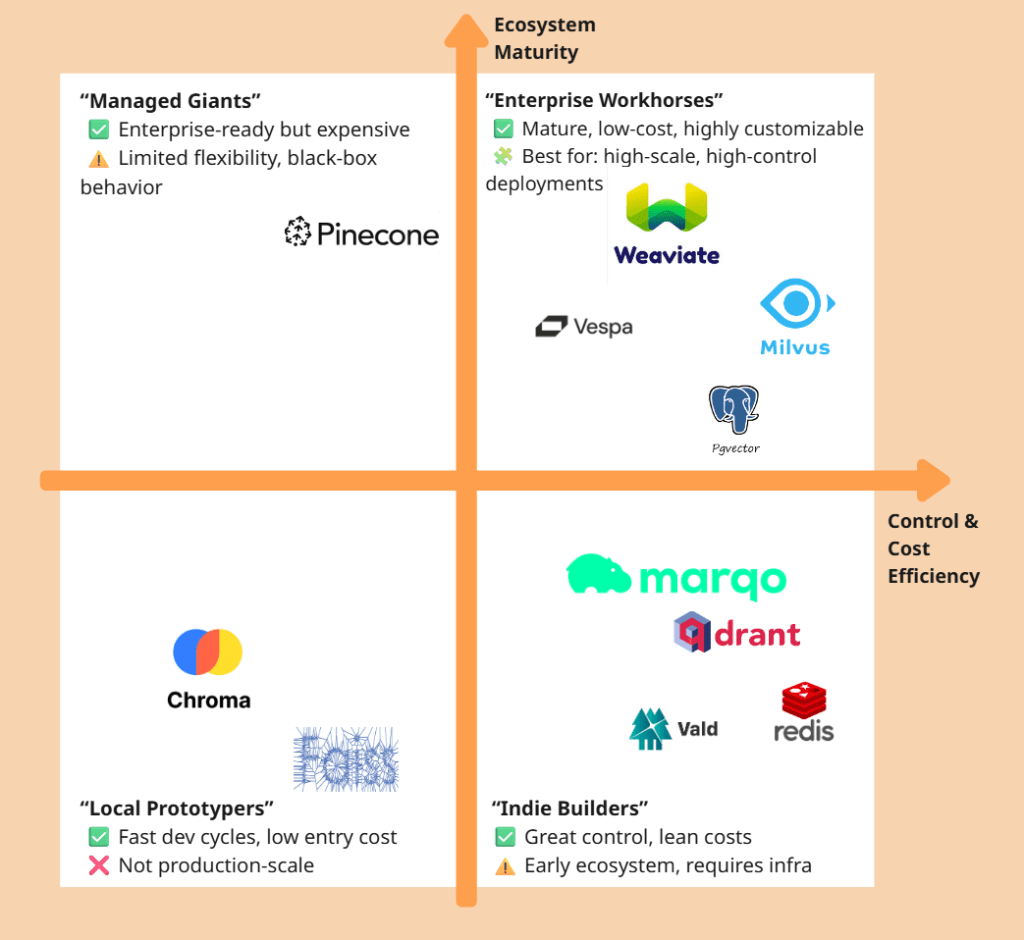
| DB | Best For | Weakness | Known Use |
|---|---|---|---|
| Qdrant | Real-time search, metadata filters | Smaller ecosystem | FragranceBuy semantic product search |
| Pinecone | SaaS scaling, enterprise ops-free | Expensive, less customizable | Harvey AI for legal Q&A retrieval |
| Weaviate | Multimodal search, LLM integration | Can be memory-intensive | Tempus AI for healthcare document indexing |
| pgvector | PostgreSQL-native, low-complexity use | Not optimal for >1M vectors | Internal tooling at early-stage startups |
Chroma (optional)
- Local, dev-focused, great for experimentation
- Ideal for prototyping or offline use cases
- Used in: R&D pipelines at AI startups and LangChain demos
Frameworks
| Tool | Use If… | Avoid If… | Real Use |
|---|---|---|---|
| LangChain | You need fast prototyping and agent support | You require fine-grained performance control | Used in 100+ AI demos and open-source agents |
| LlamaIndex | Your data is document-heavy (PDFs, tables) | You need sub-200ms response time | Used in enterprise doc Q&A bots |
| Haystack | You want observability + long-term ops | You’re just testing MVP ideas | Deployed by enterprises using Qdrant and RAG |
| Semantic Kernel | You’re on Microsoft stack (Azure, Copilot) | You need light, cross-cloud tools | Used by Microsoft in enterprise copilots |
🧠 Pro Tip: Mix-and-match works. Many real systems use OpenAI + pgvector for MVP, then migrate to Qdrant + BGE-M3 + Haystack at scale.
🚀 Deployment Patterns and Real Lessons
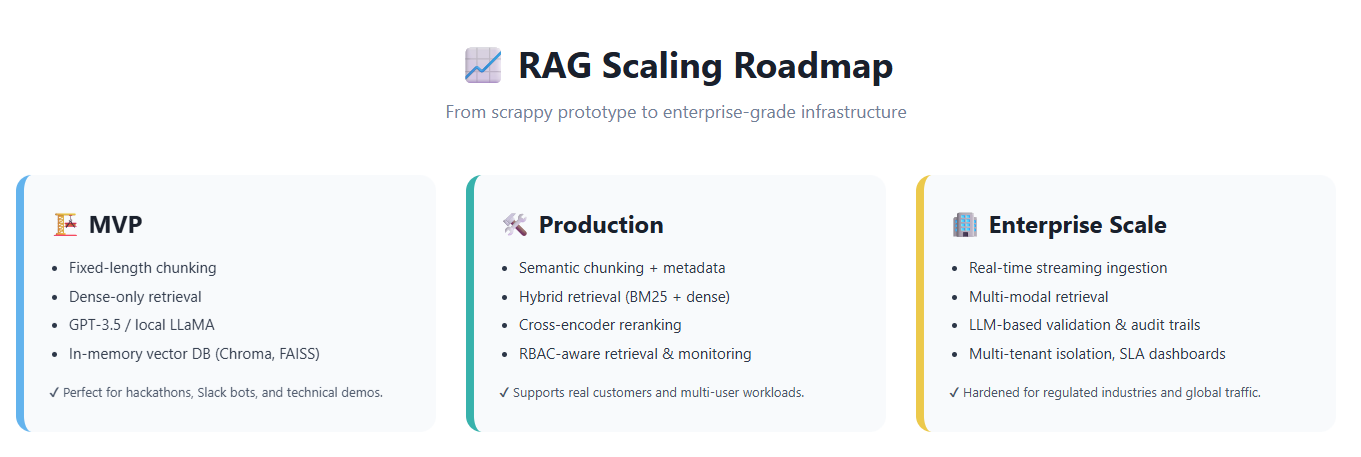
Most teams don’t start with a perfect architecture. They evolve—from quick MVPs to scalable production systems. Below are two reference patterns grounded in real-world cases.
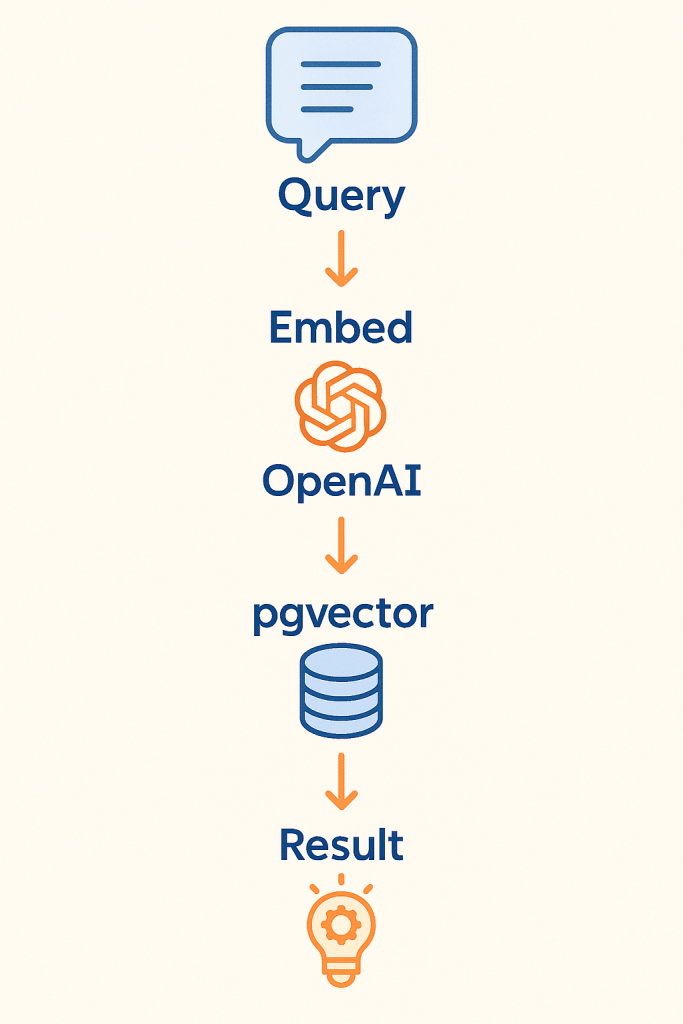
MVP Phase: Fast, Focused, Affordable
Use Case: Internal search, small product catalog, support KB, chatbot context
Stack:
- Embedding: OpenAI
text-embedding-3-large(no infra needed) - Vector DB:
pgvectoron PostgreSQL - Framework: LangChain for simple retrieval and RAG routing
🧪 Real Case: FragranceBuy
- A mid-size e-commerce site deployed semantic product search using pgvector and OpenAI
- Outcome: 3× conversion growth on desktop, 4× on mobile within 30 days
- Cost: Minimal infra; no LLM hosting; latency acceptable for sub-second queries
🔧 What Worked:
- Easy to launch, no GPU required
- Immediate uplift from replacing brittle keyword filters
⚠️ Watch Out:
- Lacks user feedback learning
- pgvector indexing slows beyond ~1M vectors
Scale Phase: Hybrid, Observability, Tuning
Use Case: Large support system, knowledge base, multilingual corpora, product discovery
Stack:
- Embedding: BGE-M3 or Cohere v3 (self-hosted or API)
- Vector DB: Qdrant (filtering, high throughput) or Pinecone (SaaS)
- Framework: Haystack (monitoring, pipelines, fallback layers)
🧪 Real Case: Voiceflow AI Support Search
- Rebuilt internal help search with hybrid strategy (BM25 + embedding)
- Outcome: 35% fewer unresolved support queries
- Added re-ranker based on user click logs and feedback
🔧 What Worked:
- Fast hybrid retrieval, with semantic fallback when keywords fail
- Embedded feedback loop (logs clicks and corrections)
⚠️ Watch Out:
- Requires tuning: chunk size, re-ranking rules, hybrid weighting
- Embedding updates need versioning (to avoid relevance decay)
These patterns aren’t static—they evolve. But they offer a foundation: start small, then optimize based on user behavior and search drift.
⚠️ Pitfalls, Limitations & Anti-Patterns
Even good semantic search systems can fail—quietly, and in production. Below are common traps that catch teams new to this space, with real-life illustrations.
Overreliance on Vector Similarity (No Re-ranking)
Problem: Relying solely on cosine similarity between vectors often surfaces “vaguely related” content instead of precise answers.
Why: Vectors capture semantic neighborhoods, but not task-specific relevance or user context.
Fix: Use re-ranking—like BM25 + embedding hybrid scoring or learning-to-rank models.
🔎 Real Issue: GitHub Copilot without context filtering would suggest irrelevant completions. Their final system includes re-ranking via neighboring tab usage and intent analysis.
Ignoring GDPR & Privacy Risks
Problem: Embeddings leak information. A vector can retain personal data even if the original text is gone.
Why: Dense vectors are hard to anonymize, and can’t be fully reversed—but can be probed.
Fix: Hash document IDs, store minimal metadata, isolate sensitive domains, avoid user PII in raw embeddings.
🔎 Caution: Healthcare or legal domains must treat embeddings as sensitive. Microsoft Copilot and Tempus AI implement access controls and data lineage for this reason.
Skipping Hybrid Search (Because It Seems “Messy”)
Problem: Many teams disable keyword search to “go all in” on vectors, assuming it’s smarter.
Why: Some queries still require precision that embeddings can’t guarantee.
Fix: Use Reciprocal Rank Fusion (RRF) or weighted ensembles to blend text and vector results.
🔎 Real Result: Voiceflow AI initially used vector-only, but missed exact-matching FAQ queries. Adding BM25 boosted retrieval precision.
Not Versioning Embeddings
Problem: Embeddings drift—newer model versions represent meaning differently. If you replace your model without rebuilding the index, quality decays.
Why: Same text → different vector → corrupted retrieval
Fix: Version each embedding model, regenerate entire index when switching.
🔎 Real Case: An e-commerce site updated from OpenAI 2 to 3-large without reindexing, and saw a sudden drop in search quality. Rolling back solved it.
Misusing Dense Retrieval for Structured Filtering
Problem: Some teams try to replace every search filter with semantic matching.
Why: Dense search is approximate. If you want “all files after 2022” or “emails tagged ‘legal’”—use metadata filters, not cosine.
Fix: Combine semantic scores with strict filter logic (like SQL WHERE clauses).
🔎 Lesson: Harvey AI layered dense retrieval with graph-based constraints for legal clause searches—only then did false positives drop.
🧪 Bonus Tip: Monitor What Users Click, Not Just What You Return
Embedding quality is hard to evaluate offline. Use logs of real searches and which results users clicked. Over time, these patterns train re-rankers and highlight drift.
📌 Summary & Strategic Recommendations
Semantic search isn’t just another search plugin—it’s becoming the default foundation for AI systems that need to understand, not just retrieve.
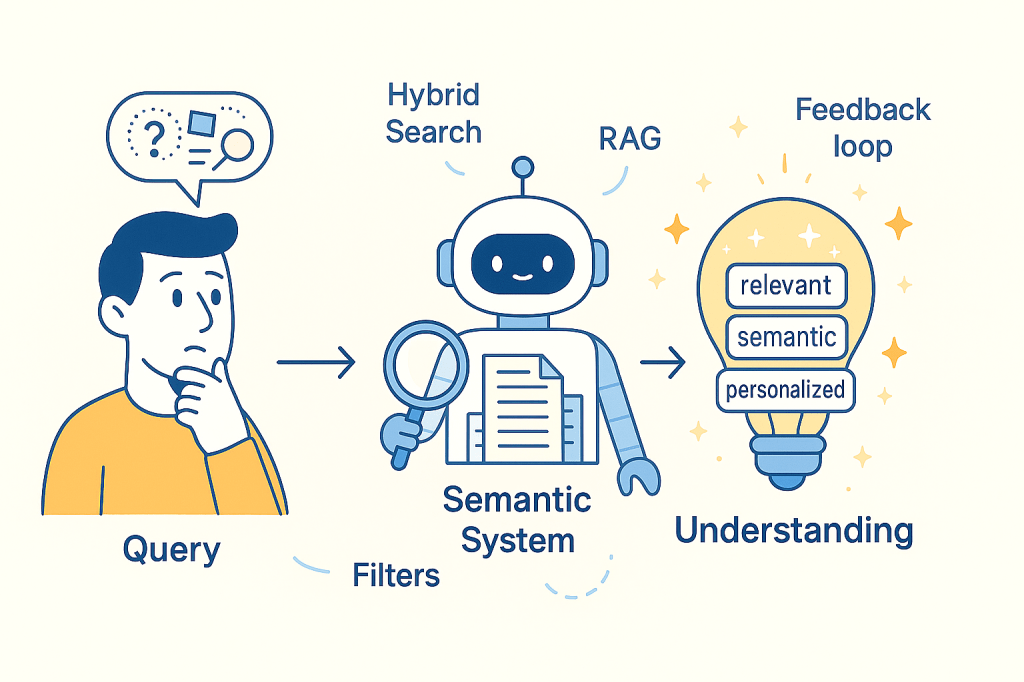
Here’s what you should take away:
Use Semantic Search Where Meaning > Keywords
- Complex catalogs (“headphones” vs. “noise-cancelling audio gear”)
- Legal, medical, financial documents where synonyms are unpredictable
- Internal enterprise search where wording varies by department or region
🧪 Real ROI: $31,754 per employee/year saved in enterprise productivitysemantic search claude
🧪 Example: Harvey AI reached 94.8% accuracy in legal document Q&A only after semantic + custom graph fusion
Default to Hybrid, Unless Latency Is Critical
- BM25 + embeddings outperform either alone in most cases
- If real-time isn’t required, hybrid gives best coverage and robustness
🧪 Real Case: Voiceflow AI improved ticket resolution by combining semantic ranking with keyword fallback
Choose Tools by Scale × Complexity × Control
| Need | Best Tooling Stack |
|---|---|
| Fast MVP | OpenAI + pgvector + LangChain |
| Production RAG | Cohere or BGE-M3 + Qdrant + Haystack |
| Microsoft-native | OpenAI + Semantic Kernel + Azure |
| Heavy structure | LlamaIndex + metadata filters |
🧠 Don’t get locked into your first tool—plan for embedding upgrades and index regeneration.
Treat Semantic Indexing as AI Infrastructure
Search, RAG, chatbots, agents—they all start with high-quality indexing.
- Poor chunking → irrelevant answers
- Wrong embeddings → irrelevant documents
- Missing metadata → unfilterable output
🧪 Example: Salesforce Einstein used user-role metadata in its index to cut irrelevant clicks by 50%.
📈 What’s Coming
- Multimodal Search: text + image + audio embeddings (e.g., Titan, CLIP)
- Agentic Retrieval: query breakdown, multi-step search, tool use
- Self-Adaptive Indexes: auto-retraining, auto-chunking, drift tracking


 Tellian