As businesses increasingly adopt Retrieval-Augmented Generation (RAG) to power intelligent applications, a specialized market of platforms known as “RAG as a Service” (RaaS) has rapidly matured. These services aim to abstract away the significant engineering challenges involved in building, deploying, and maintaining a production-ready RAG system.
However, the landscape is not limited to commercial, managed services. A vibrant ecosystem of open-source, self-hostable platforms has emerged, offering a compelling alternative for organizations that require greater control, data sovereignty, and deeper customization. These solutions provide a strategic middle ground between building from scratch with frameworks like LangChain and buying a proprietary, “black box” service.
This article provides a comprehensive overview of the modern RAG landscape, comparing leading commercial RaaS providers with their powerful open-source counterparts to help you choose the right path for your project.
Commercial RaaS Platforms: Managed for Speed and Simplicity
Commercial RaaS platforms are designed to deliver value with minimal setup. They offer end-to-end managed services that handle the underlying complexity of data ingestion, vectorization, and secure deployment, allowing development teams to focus on application logic.
Product Overview: Vectara is an end-to-end cloud platform that puts a heavy emphasis on minimizing hallucinations and providing verifiable, fact-grounded answers. It operates as a fully managed service, using its own suite of proprietary AI models engineered for retrieval accuracy and factual consistency.
Architectural Approach:
Grounded Generation: A core design principle is forcing generated answers to be based strictly on the provided documents, complete with inline citations to ensure verifiability.
Proprietary Models: It uses specialized models like the HHEM (Hallucination Evaluation Model), which acts as a real-time fact-checker, to improve the reliability of its outputs.
Black Box Design: The platform is intentionally a “black box,” abstracting away the internal components to deliver high accuracy out-of-the-box, at the expense of granular customizability.
Well-Suited For: Enterprise applications where factual precision is a non-negotiable requirement, such as internal policy chatbots, financial reporting tools, or customer support systems dealing with technical information.
Product Overview: Nuclia is an all-in-one RAG platform distinguished by its focus on Security & Governance. Its standout feature is the option for on-premise deployment, which allows enterprises to maintain full control over sensitive data.
Architectural Approach:
Data Sovereignty: The ability to run the entire platform within a company’s own firewall is its main differentiator, making it ideal for data-sensitive environments.
Versatile Data Processing: It is engineered to process a wide range of unstructured data, including video, audio, and complex PDFs, making them fully searchable.
Certified Security: The platform adheres to high security standards like SOC 2 Type II and ISO 27001, providing enterprise-grade assurance.
Well-Suited For: Organizations in highly regulated industries (e.g., finance, legal, healthcare) or those handling sensitive R&D data that cannot be exposed to a public cloud environment.
Product Overview: Ragie is a fully-managed RAG platform designed for developer velocity and ease of use. It aims to lower the barrier to entry for building RAG applications by providing simple APIs and a large library of pre-built connectors.
Architectural Approach:
Managed Connectors: A key feature is its library of connectors that automate data syncing from sources like Google Drive, Notion, and Confluence, reducing integration overhead.
Accessible Features: It packages advanced capabilities like multimodal search and reranking into all its plans, including a free tier, to encourage rapid prototyping.
Simplicity over Control: It is designed for ease of use, which means it offers less granular control over internal components like chunking algorithms or underlying LLMs.
Well-Suited For: Startups and development teams that need to build and launch RAG applications quickly and cost-effectively, especially for prototypes, MVPs, or less critical internal tools.
Product Overview: Ragu AI operates more like a flexible framework than a closed system. It emphasizes modularity and control, allowing expert teams to assemble a bespoke RAG pipeline using their own preferred components.
Architectural Approach:
Bring Your Own Components (BYOC): Its core philosophy is integration. Users can plug in their own vector database (e.g., Pinecone), LLMs, and other tools, giving them full control over the stack.
Pipeline Optimization: It provides tools for A/B testing different pipeline configurations, enabling teams to empirically tune the system for their specific needs.
Orchestration Layer: It acts as a managed orchestration layer that connects to a company’s existing infrastructure, avoiding the need for large-scale data migration.
Well-Suited For: Experienced AI/ML teams building sophisticated, custom RAG solutions that require deep integration with existing data stacks or the use of specific, fine-tuned models.
Open-Source RAG Platforms: Built for Control and Customization
Open-source platforms offer a powerful alternative for teams that require full data sovereignty, architectural control, and the ability to customize their RAG pipeline. These are not just libraries; they are complete, deployable application stacks.
🧩 Dify.ai: The Visual AI Application Development Platform
Product Overview: Dify.ai is a comprehensive, open-source LLM application development platform that extends beyond RAG to encompass a wide range of agentic AI applications. Its low-code/no-code visual interface democratizes AI development for a broad audience.
Architectural Approach:
Visual Workflow Builder: Its centerpiece is an intuitive, drag-and-drop canvas for constructing, testing, and deploying complex AI workflows and multi-step agents without extensive coding.
Integrated RAG Engine: Includes a powerful, built-in RAG pipeline that manages the entire lifecycle of knowledge augmentation, from document ingestion and parsing to advanced retrieval strategies.
Backend-as-a-Service (BaaS): Provides a complete set of RESTful APIs, allowing developers to programmatically integrate Dify’s backend into their own custom applications.
Well-Suited For: Cross-functional teams (Product Managers, Developers, Marketers) that need to rapidly build, prototype, and deploy AI-powered applications, including RAG chatbots and complex agents.
Product Overview: RAGFlow is an open-source RAG platform singularly focused on solving “deep document understanding.” Its philosophy is that RAG system performance is limited by the quality of data extraction, especially from complex, unstructured formats.
Architectural Approach:
Template-Based Chunking: A key differentiator is its use of customizable visual templates for document chunking, allowing for more logical and contextually aware segmentation of complex layouts (e.g., multi-column PDFs).
Hybrid Search: Employs a hybrid search approach that combines modern vector search with traditional keyword-based search to enhance accuracy and handle diverse query types.
Graph-Enhanced RAG: Incorporates graph-based retrieval mechanisms to understand the relationships between different parts of a document, providing more contextually relevant answers.
Well-Suited For: Organizations whose primary challenge is extracting knowledge from large volumes of complex, poorly structured, or scanned documents (e.g., in finance, legal, and engineering).
🌐 TrustGraph: The Enterprise GraphRAG Intelligence Platform
Product Overview: TrustGraph is an open-source platform engineered for building enterprise-grade AI applications that demand deep contextual reasoning. It moves “Beyond Basic RAG” by embracing a more advanced GraphRAG architecture.
Architectural Approach:
GraphRAG Engine: Automates the process of building a knowledge graph from ingested data, identifying entities and their relationships. This enables multi-hop reasoning that traditional RAG cannot perform.
Asynchronous Pub/Sub Backbone: Built on Apache Pulsar, ensuring reliability, fault tolerance, and scalability for demanding enterprise environments.
Reusable Knowledge Packages: Stores the processed graph structure and vector embeddings in modular packages, so the computationally expensive data structuring is only performed once.
Well-Suited For: Sophisticated technology teams in complex, regulated industries (e.g., finance, national security, scientific research) needing high-accuracy, explainable AI that can reason over vast, interconnected datasets.
Platform Comparison
The choice between a commercial and open-source platform depends on your organization’s priorities. Here is a comparison grouped by key evaluation criteria.
Platform
Focus
Deployment
Best For
Pricing
Vectara
🎯 Accuracy
☁️ Cloud
Enterprise
💵 Subscription
Nuclia
🛡️ Security
🏢 On-Premise
Regulated
💵 Subscription
Ragie
🚀 Speed
☁️ Cloud
Startups
💵 Subscription
Ragu AI
🛠️ Control
🧩 BYOC
Experts
💵 Subscription
Dify.ai
🎨 Visual Dev
☁️/🏢 Hybrid
All Teams
🎁 Freemium
RAGFlow
📄 Doc Parsing
🏢 Self-Hosted
Data-Heavy
🆓 Open Source
TrustGraph
🌐 GraphRAG
🏢 Self-Hosted
Researchers
🆓 Open Source
Conclusion: A Spectrum of Choice in a Maturing Market
The “build vs. buy” decision for RAG infrastructure has evolved into a more nuanced “build vs. buy vs. adapt” framework. The availability of mature RaaS platforms and powerful open-source alternatives means that building from scratch is often no longer the most efficient path.
The current landscape reflects the diverse needs of the market. The choice is no longer simply whether to buy, but which service philosophy—or open-source architecture—best aligns with a project’s specific goals. Whether the priority is out-of-the-box accuracy, absolute data security, rapid development, or deep architectural control, there is a solution available. This variety empowers teams to select a platform that lets them move beyond infrastructure challenges and focus on creating innovative, data-driven applications that unlock the true value of their knowledge.
“If RAG is how intelligent systems respond, semantic search is how they understand.”
In our last post, we explored how Retrieval-Augmented Generation (RAG) unlocked the ability for AI systems to answer questions in rich, fluent, contextual language. But how do these systems decide what information even matters?
That’s where semantic search steps in.
Semantic search is the unsung engine behind intelligent systems—helping GitHub Copilot generate 46% of developer code, Shopify drive 700+ orders in 90 days, and healthcare platforms like Tempus AI match patients to life-saving treatments. It doesn’t just find “words”—it finds meaning.
This post goes beyond the buzz. We’ll show what real semantic search looks like in 2025:
Architectures that power enterprise copilots and recommendation systems.
Tools and best practices that go beyond vector search hype.
Lessons from real deployments—from legal tech to e-commerce to support automation.
Just like RAG changed how we write answers, semantic search is changing how systems think. Let’s dive into the practical patterns shaping this transformation.
🧭 Why Keyword Search Fails, and Semantic Search Wins
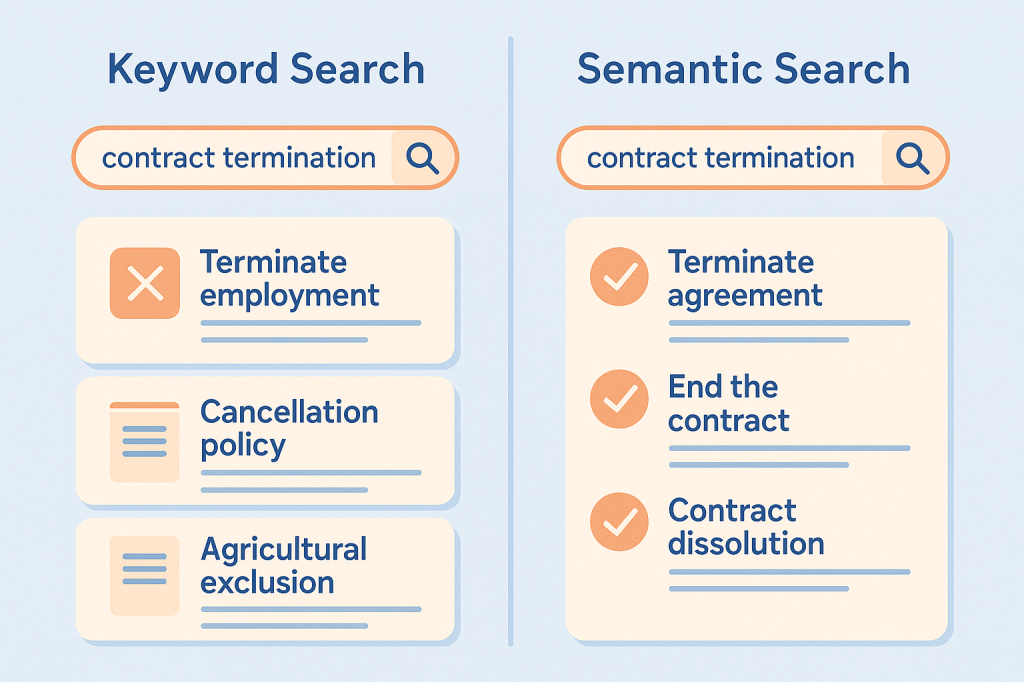
Most search systems still rely on keyword matching—fast, simple, and well understood. But when relevance depends on meaning, not exact terms, this approach consistently breaks down.
Common Failure Modes
Synonym blindness: Searching for “doctoral candidates” misses pages indexed under “PhD students.”
Multilingual mismatch: A support ticket in Spanish isn’t found by an English-only keyword query—even if translated equivalents exist.
Overfitting to phrasing: Searching legal clauses for “terminate agreement” doesn’t return documents using “contract dissolution,” even if conceptually identical.
These aren’t edge cases—they’re systemic.
A 2024 benchmark study showed enterprises lose an average of $31,754 per employee per year due to inefficient internal search systemssemantic search claude. The gap is especially painful in:
Customer support, where unresolved queries escalate due to missed knowledge base hits.
Legal search, where clause discovery depends on phrasing, not legal equivalence.
E-commerce, where product searches fail unless users mirror site taxonomy (“running shoes” vs. “sneakers”).
Semantic search addresses these issues by modeling similarity in meaning—not just words. But that doesn’t mean it always wins. The next section unpacks what it is, how it works, and when it actually makes sense to use.
🧠 What Is Semantic Search? A Practical Model
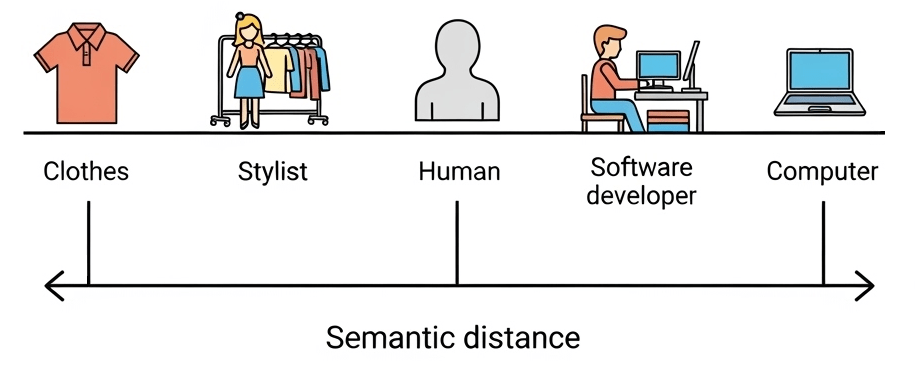
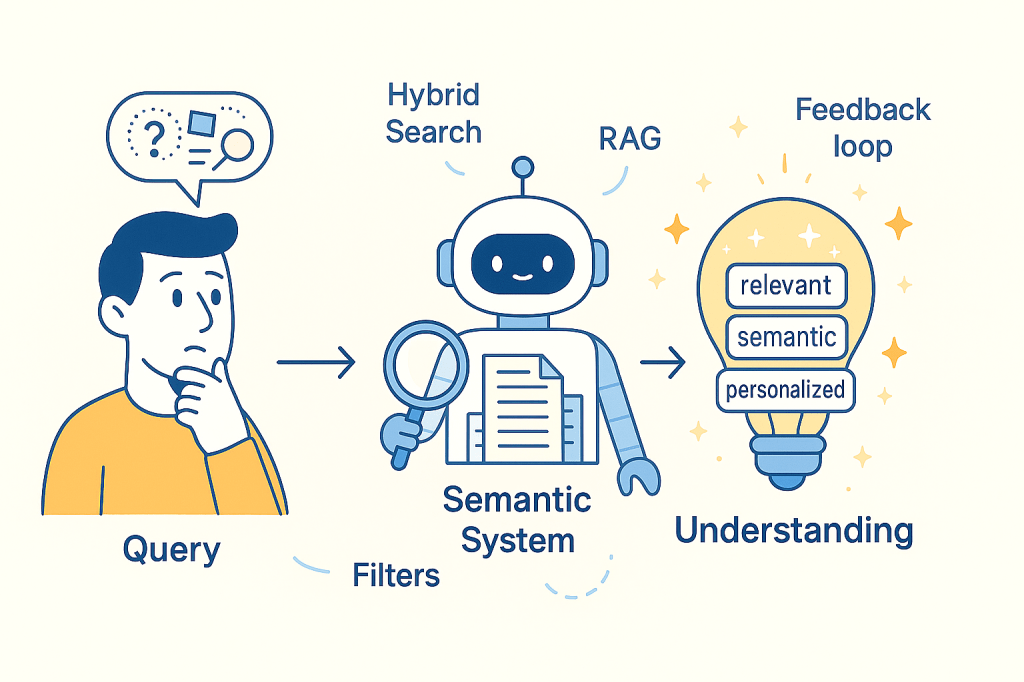
Semantic search retrieves information based on meaning, not surface words. It relies on transforming text into vectors—mathematical representations that cluster similar ideas together, regardless of how they’re phrased.
Lexical vs. Semantic: A Mental Model
Lexical search finds exact word matches.
Query: “laptop stand”
Misses: “notebook riser”, “portable desk support”
Semantic search maps all these terms into nearby positions in vector space.The system knows they mean similar things, even without shared words.
Core Components
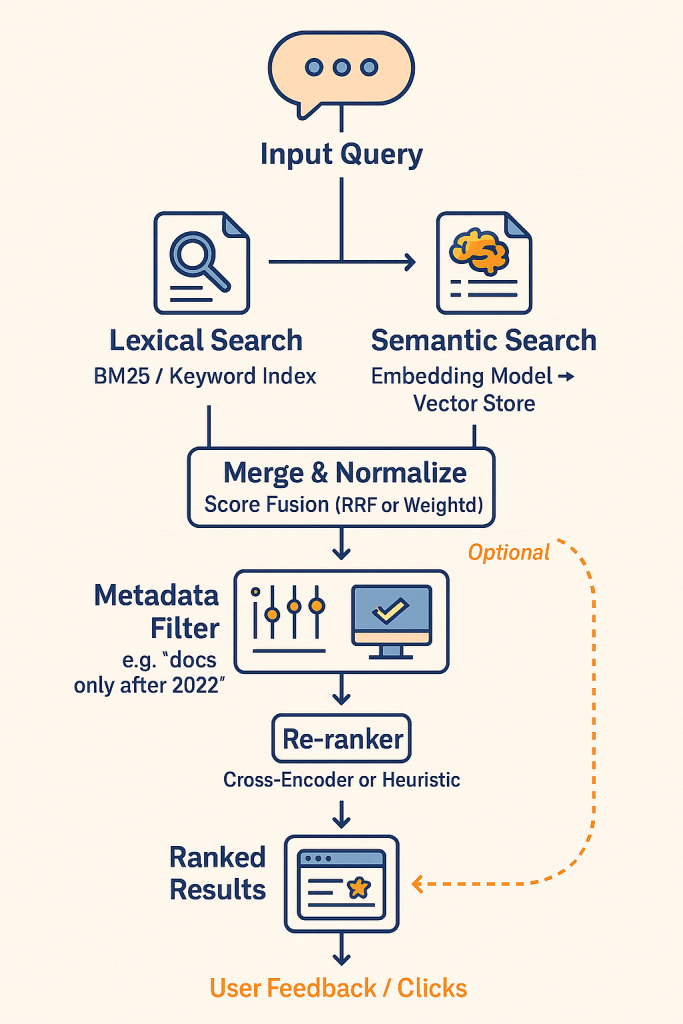
Embeddings: Text is encoded into a dense vector (e.g., 768 to 3072 dimensions), capturing semantic context.
Similarity: Queries are compared to documents using cosine similarity or dot product.
Hybrid Fusion: Combines lexical and semantic scores using techniques like Reciprocal Rank Fusion (RRF) or weighted ensembling.
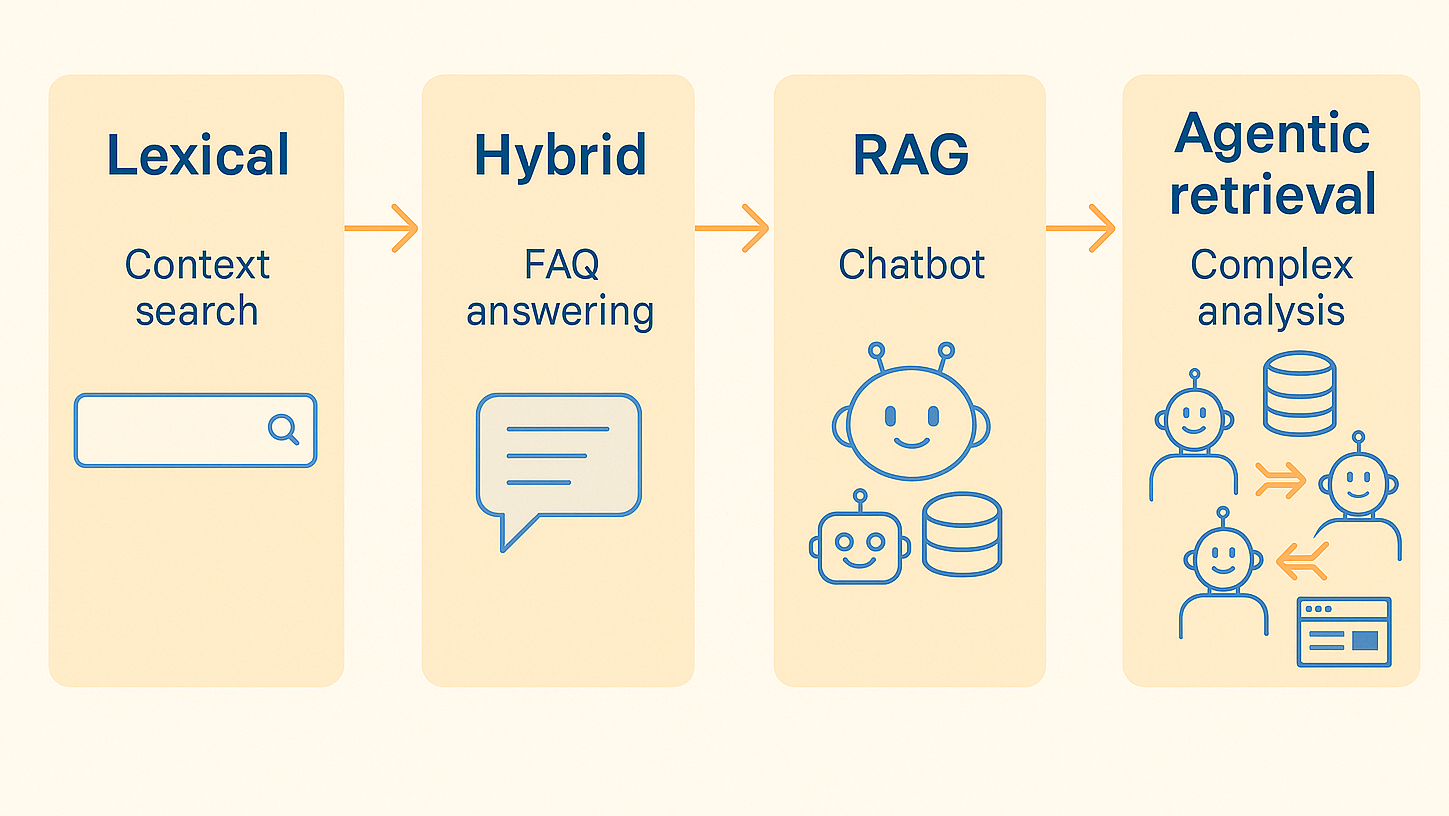
Evolution of Approaches
Stage
Description
When Used
Keyword-only
Classic full-text search
Simple filters, structured data
Vector-only
Embedding similarity, no text indexing
Small scale, fuzzy lookup
Hybrid Search
Combine lexical + semantic (RRF, CC)
Most production systems
RAG
Retrieve + generate with LLMs
Question answering, chatbots
Agentic Retrieval
Multi-step, context-aware, tool-using AI
Autonomous systems
Semantic search isn’t just “vector lookup.” It’s a design pattern built from embeddings, retrieval logic, scoring strategies, and increasingly—reasoning modules.
🧱 Architectural Building Blocks and Best Practices
Designing a semantic search system means combining several moving parts into a cohesive pipeline—from turning text into vectors to returning ranked results. Below is a working blueprint.
Core Components: What Every System Needs
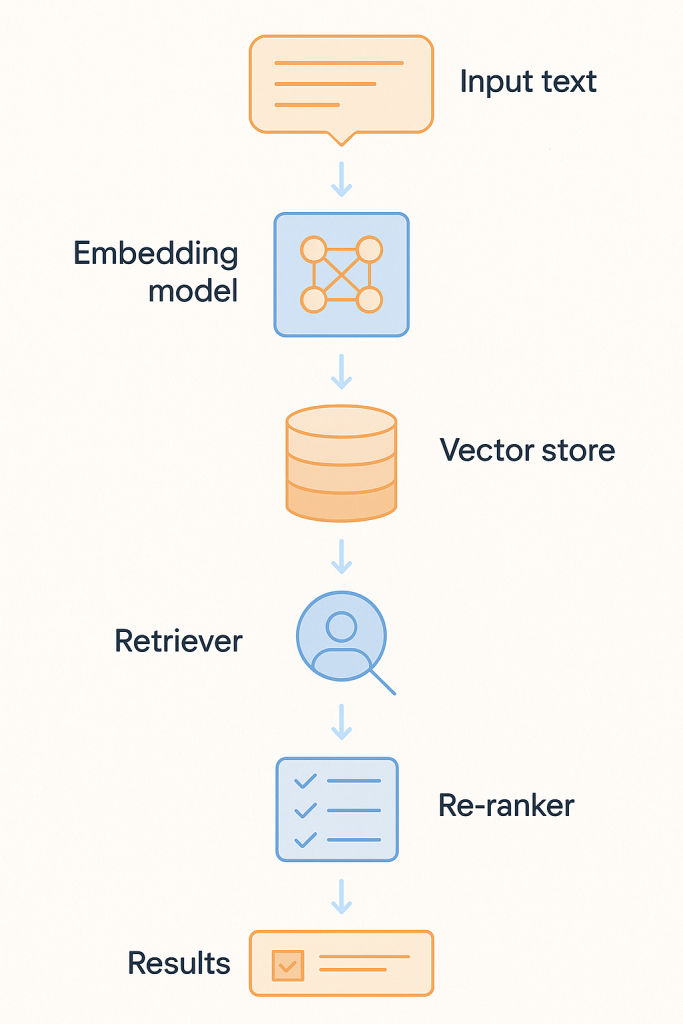
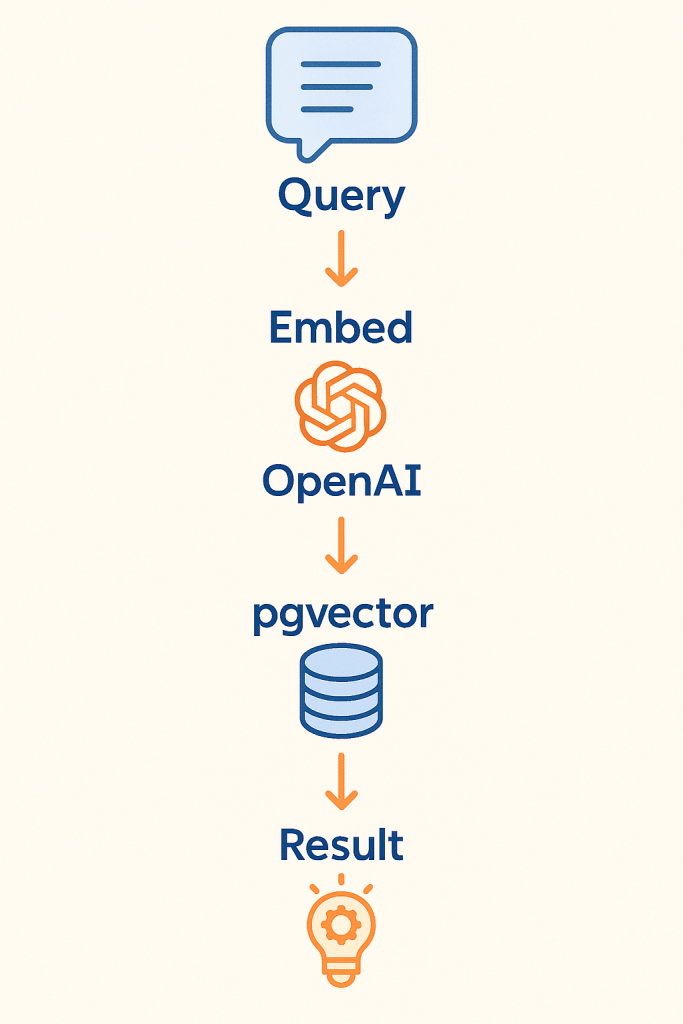
Let’s walk through the core flow:
Embedding Layer
Converts queries and documents into dense vectors using a model like:
OpenAI text-embedding-3-large (plug-and-play, high quality)
Cohere v3 (multilingual)
BGE-M3 or Mistral-E5 (open-source options)
Vector Store
Indexes embeddings for fast similarity search:
Qdrant (ultra-low latency, good for filtering)
Weaviate (multimodal, plug-in architecture)
pgvector (PostgreSQL extension, ideal for small-scale or internal use)
Retriever Orchestration
Frameworks like:
LangChain (fast prototyping, agent support)
LlamaIndex (good for structured docs)
Haystack (production-grade with observability)
Re-ranker (Precision Layer)
Refines top-N results from the retriever stage using more sophisticated logic:
Cross-Encoder Models: Jointly score query+document pairs with higher accuracy
Heuristic Scorers: Prioritize based on position, title match, freshness, or user profile
Purpose: Suppress false positives and boost the most useful answers
Often used with LLMs for re-ranking in RAG and legal search pipelines
✅ Store embeddings alongside original text and metadata → Enables fallback keyword search, filterable results, and traceable audit trails. Used in: Salesforce Einstein — supports semantic and lexical retrieval in enterprise CRM with user-specific filters.
✅ Log search-click feedback loops → Use post-click data to re-rank results over time. Used in: Shopify — improved precision by learning actual user paths after product search.
✅ Use hybrid search as the default → Pure vector often retrieves plausible but irrelevant text. Used in: Voiceflow AI — combining keyword match with embedding similarity reduced unresolved support cases by 35%.
✅ Re-evaluate embedding models every 3–6 months → Models degrade as usage context shifts. Seen in: GitHub Copilot — regular retraining required as codebase evolves.
✅ Run offline re-ranking experiments → Don’t trust similarity scores blindly—test on real query-result pairs. Used in: Harvey AI — false positives in legal Q&A dropped after introducing graph-based reranking layer.
🧩Use Case Patterns: Architectures by Purpose
Semantic search isn’t one-size-fits-all. Different problem domains call for different architectural patterns. Below is a compact guide to five proven setups, each aligned with a specific goal and backed by production examples.
Pattern
Architecture
Real Case / Result
Enterprise Search
Hybrid search + user modeling
Salesforce Einstein: −50% click depth in internal CRM search
RAG-based Systems
Dense retriever + LLM generation
GitHub Copilot: 46% of developer code generated via contextual completion
Recommendation Engines
Vector similarity + collaborative signals
Shopify: 700+ orders in 90 days from semantic product search
Monitoring & Support
Real-time semantic + event ranking
Voiceflow AI: 35% drop in unresolved support tickets
Semantic ETL / Indexing
Auto-labeling + semantic clustering
Tempus AI: structure unstructured medical notes for retrieval across 20+ hospitals
🧠 Enterprise Search
Employees often can’t find critical internal information—even when it exists. Hybrid systems help match queries to phrased variations, acronyms, and internal jargon.
Query: “Leads in NY Q2”
Result: Finds “All active prospects in New York during second quarter,” even if phrased differently
Example: Salesforce uses hybrid vector + text with user-specific filters (location, role, permissions)
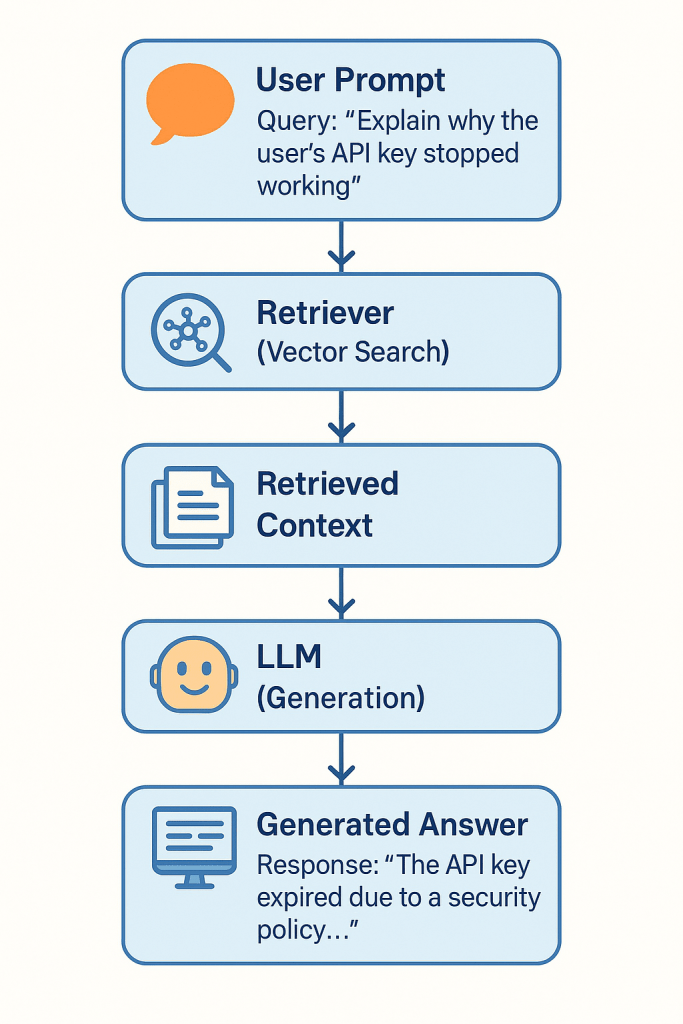
💬 RAG-based Systems
When search must become language generation, Retrieval-Augmented Generation (RAG) pipelines retrieve semantic matches and feed them into LLMs for synthesis.
Query: “Explain why the user’s API key stopped working”
System: Retrieves changelog, error logs → generates full explanation
Example: GitHub Copilot uses embedding-powered retrieval across billions of code fragments to auto-generate dev suggestions.
🛒 Recommendation Engines
Semantic search improves discovery when users don’t know what to ask—or use unexpected phrasing.
Query: “Gift ideas for someone who cooks”
Matches: “chef knife,” “cast iron pan,” “Japanese cookbook”
Example: Shopify’s implementation led to a direct sales lift—Rakuten saw a +5% GMS boost.
📞 Monitoring & Support
Support systems use semantic matching to find answers in ticket archives, help docs, or logs—even with vague or novel queries.
Query: “My bot isn’t answering messages after midnight”
Matches: archived incidents tagged with “off-hours bug”
Example: Voiceflow AI reduced unresolved queries by 35% using real-time vector retrieval + fallback heuristics.
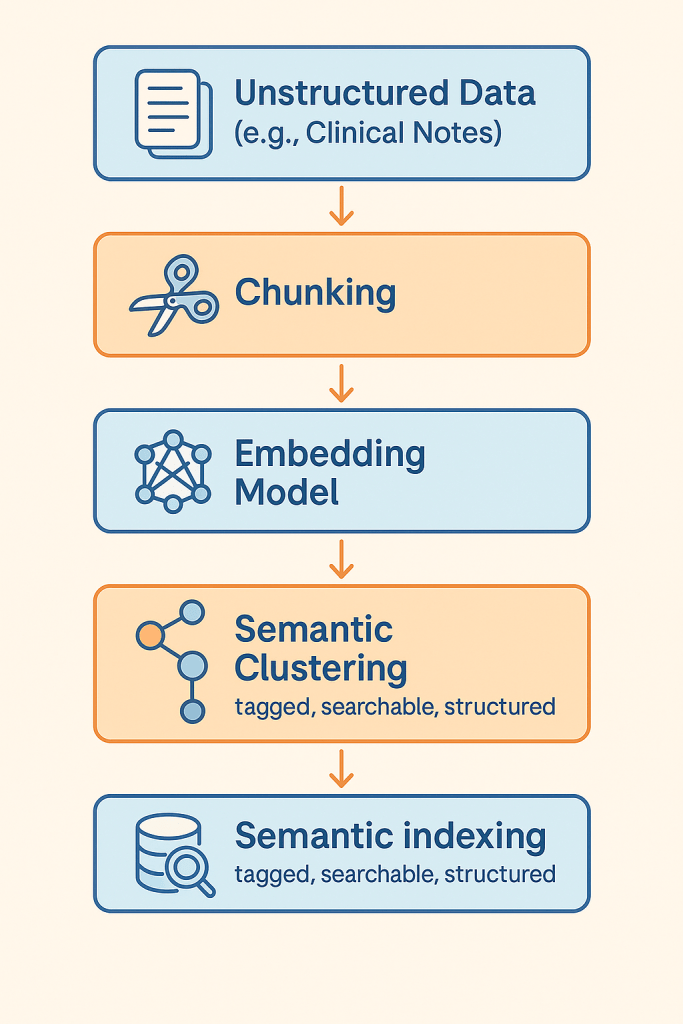
🧬 Semantic ETL / Indexing
Large unstructured corpora—e.g., medical notes, financial reports—can be semantically indexed to enable fast filtering and retrieval later.
Source: Clinical notes, radiology reports
Process: Auto-split, embed, cluster, label
Example: Tempus AI created semantic indexes of medical data across 65 academic centers, powering search for treatment and diagnosis pathways.
🛠️ Tooling Guide: What to Choose and When
Choosing the right tool depends on scale, latency needs, domain complexity, and whether you’re optimizing for speed, cost, or control. Below is a guide to key categories—embedding models, vector databases, and orchestration frameworks.
Embedding Models
OpenAI text-embedding-3-large
General-purpose, high-quality, plug-and-play
Ideal for teams prioritizing speed over control
Used by: Notion AI for internal semantic document search
Cohere Embed v3
Multilingual (100+ languages), efficient, with compression-aware training
Strong in global support centers or multilingual corpora
Used by: Cohere’s own internal customer support bots
BGE-M3 / Mistral-E5
Open-source, high-performance models, require your own infrastructure
Better suited for teams with GPU resources and need for fine-tuning
Used in: Voiceflow AI for scalable customer support retrieval
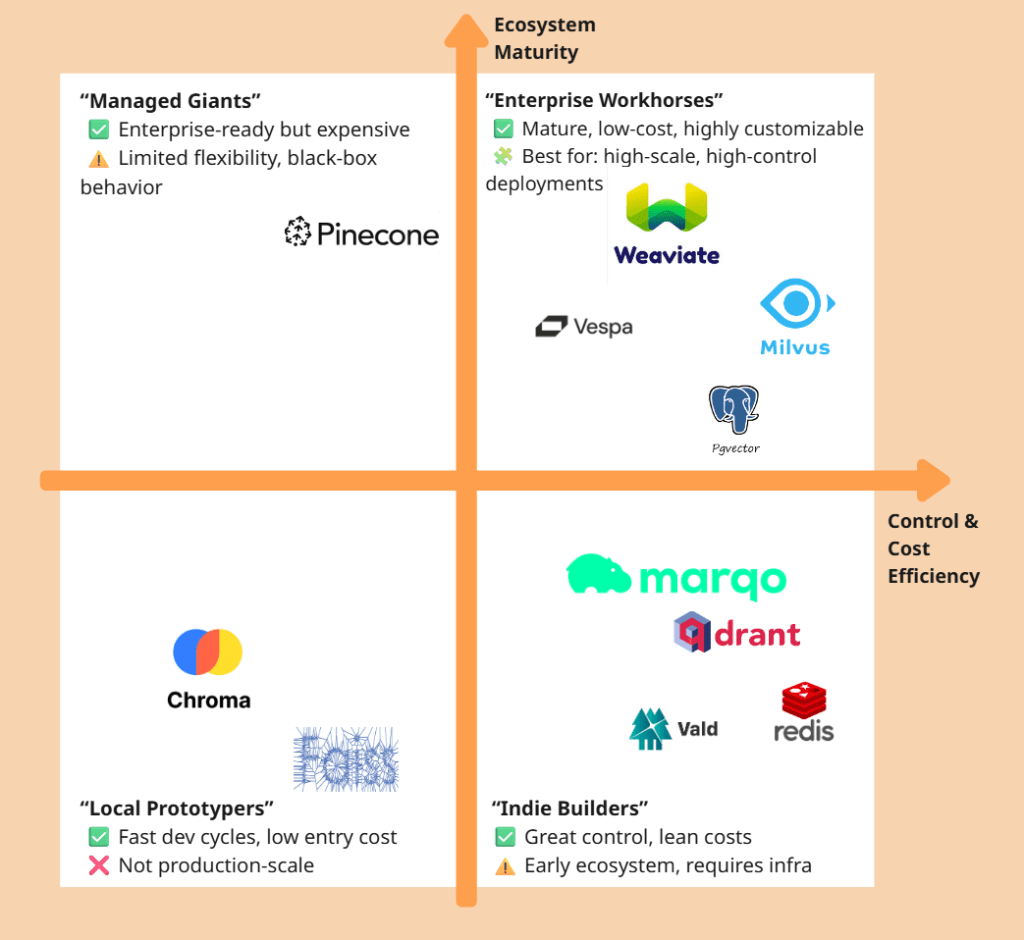
Vector Databases
DB
Best For
Weakness
Known Use
Qdrant
Real-time search, metadata filters
Smaller ecosystem
FragranceBuy semantic product search
Pinecone
SaaS scaling, enterprise ops-free
Expensive, less customizable
Harvey AI for legal Q&A retrieval
Weaviate
Multimodal search, LLM integration
Can be memory-intensive
Tempus AI for healthcare document indexing
pgvector
PostgreSQL-native, low-complexity use
Not optimal for >1M vectors
Internal tooling at early-stage startups
Chroma (optional)
Local, dev-focused, great for experimentation
Ideal for prototyping or offline use cases
Used in: R&D pipelines at AI startups and LangChain demos
Frameworks
Tool
Use If…
Avoid If…
Real Use
LangChain
You need fast prototyping and agent support
You require fine-grained performance control
Used in 100+ AI demos and open-source agents
LlamaIndex
Your data is document-heavy (PDFs, tables)
You need sub-200ms response time
Used in enterprise doc Q&A bots
Haystack
You want observability + long-term ops
You’re just testing MVP ideas
Deployed by enterprises using Qdrant and RAG
Semantic Kernel
You’re on Microsoft stack (Azure, Copilot)
You need light, cross-cloud tools
Used by Microsoft in enterprise copilots
🧠 Pro Tip: Mix-and-match works. Many real systems use OpenAI + pgvector for MVP, then migrate to Qdrant + BGE-M3 + Haystack at scale.
🚀 Deployment Patterns and Real Lessons
Most teams don’t start with a perfect architecture. They evolve—from quick MVPs to scalable production systems. Below are two reference patterns grounded in real-world cases.
MVP Phase: Fast, Focused, Affordable
Use Case: Internal search, small product catalog, support KB, chatbot context Stack:
Embedding: OpenAI text-embedding-3-large (no infra needed)
Vector DB: pgvector on PostgreSQL
Framework: LangChain for simple retrieval and RAG routing
🧪 Real Case: FragranceBuy
A mid-size e-commerce site deployed semantic product search using pgvector and OpenAI
Outcome: 3× conversion growth on desktop, 4× on mobile within 30 days
Cost: Minimal infra; no LLM hosting; latency acceptable for sub-second queries
🔧 What Worked:
Easy to launch, no GPU required
Immediate uplift from replacing brittle keyword filters
⚠️ Watch Out:
Lacks user feedback learning
pgvector indexing slows beyond ~1M vectors
Scale Phase: Hybrid, Observability, Tuning
Use Case: Large support system, knowledge base, multilingual corpora, product discovery Stack:
Embedding: BGE-M3 or Cohere v3 (self-hosted or API)
Vector DB: Qdrant (filtering, high throughput) or Pinecone (SaaS)
Embedding updates need versioning (to avoid relevance decay)
These patterns aren’t static—they evolve. But they offer a foundation: start small, then optimize based on user behavior and search drift.
⚠️ Pitfalls, Limitations & Anti-Patterns
Even good semantic search systems can fail—quietly, and in production. Below are common traps that catch teams new to this space, with real-life illustrations.
Overreliance on Vector Similarity (No Re-ranking)
Problem: Relying solely on cosine similarity between vectors often surfaces “vaguely related” content instead of precise answers. Why: Vectors capture semantic neighborhoods, but not task-specific relevance or user context. Fix: Use re-ranking—like BM25 + embedding hybrid scoring or learning-to-rank models.
🔎 Real Issue: GitHub Copilot without context filtering would suggest irrelevant completions. Their final system includes re-ranking via neighboring tab usage and intent analysis.
Ignoring GDPR & Privacy Risks
Problem: Embeddings leak information. A vector can retain personal data even if the original text is gone. Why: Dense vectors are hard to anonymize, and can’t be fully reversed—but can be probed. Fix: Hash document IDs, store minimal metadata, isolate sensitive domains, avoid user PII in raw embeddings.
🔎 Caution: Healthcare or legal domains must treat embeddings as sensitive. Microsoft Copilot and Tempus AI implement access controls and data lineage for this reason.
Skipping Hybrid Search (Because It Seems “Messy”)
Problem: Many teams disable keyword search to “go all in” on vectors, assuming it’s smarter. Why: Some queries still require precision that embeddings can’t guarantee. Fix: Use Reciprocal Rank Fusion (RRF) or weighted ensembles to blend text and vector results.
🔎 Real Result: Voiceflow AI initially used vector-only, but missed exact-matching FAQ queries. Adding BM25 boosted retrieval precision.
Not Versioning Embeddings
Problem: Embeddings drift—newer model versions represent meaning differently. If you replace your model without rebuilding the index, quality decays. Why: Same text → different vector → corrupted retrieval Fix: Version each embedding model, regenerate entire index when switching.
🔎 Real Case: An e-commerce site updated from OpenAI 2 to 3-large without reindexing, and saw a sudden drop in search quality. Rolling back solved it.
Misusing Dense Retrieval for Structured Filtering
Problem: Some teams try to replace every search filter with semantic matching. Why: Dense search is approximate. If you want “all files after 2022” or “emails tagged ‘legal’”—use metadata filters, not cosine. Fix: Combine semantic scores with strict filter logic (like SQL WHERE clauses).
🔎 Lesson: Harvey AI layered dense retrieval with graph-based constraints for legal clause searches—only then did false positives drop.
🧪 Bonus Tip: Monitor What Users Click, Not Just What You Return
Embedding quality is hard to evaluate offline. Use logs of real searches and which results users clicked. Over time, these patterns train re-rankers and highlight drift.
📌 Summary & Strategic Recommendations
Semantic search isn’t just another search plugin—it’s becoming the default foundation for AI systems that need to understand, not just retrieve.
Here’s what you should take away:
Use Semantic Search Where Meaning > Keywords
Complex catalogs (“headphones” vs. “noise-cancelling audio gear”)
Legal, medical, financial documents where synonyms are unpredictable
Internal enterprise search where wording varies by department or region
🧪 Real ROI: $31,754 per employee/year saved in enterprise productivitysemantic search claude 🧪 Example: Harvey AI reached 94.8% accuracy in legal document Q&A only after semantic + custom graph fusion
Default to Hybrid, Unless Latency Is Critical
BM25 + embeddings outperform either alone in most cases
If real-time isn’t required, hybrid gives best coverage and robustness
🧪 Real Case: Voiceflow AI improved ticket resolution by combining semantic ranking with keyword fallback
Choose Tools by Scale × Complexity × Control
Need
Best Tooling Stack
Fast MVP
OpenAI + pgvector + LangChain
Production RAG
Cohere or BGE-M3 + Qdrant + Haystack
Microsoft-native
OpenAI + Semantic Kernel + Azure
Heavy structure
LlamaIndex + metadata filters
🧠 Don’t get locked into your first tool—plan for embedding upgrades and index regeneration.
Treat Semantic Indexing as AI Infrastructure
Search, RAG, chatbots, agents—they all start with high-quality indexing.
Poor chunking → irrelevant answers
Wrong embeddings → irrelevant documents
Missing metadata → unfilterable output
🧪 Example: Salesforce Einstein used user-role metadata in its index to cut irrelevant clicks by 50%.
Latest practices, real architectures, and when NOT to use RAG
🎯The Paradigm Shift
💰 The $50 Million Question
Picture this: A mahogany-paneled boardroom on the 47th floor of a Manhattan skyscraper. The CTO stands before the executive team, laser pointer dancing across slides filled with AI acronyms.
“We need RAG everywhere!” she declares, her voice cutting through the morning air. “Our competitors are using it. McKinsey says it’s transformative. We’re allocating $50 million for company-wide RAG implementation.”
The board members nod sagely. The CFO scribbles numbers. The CEO leans forward, ready to approve.
But here’s what nobody in that room wants to admit: They might be about to waste $50 million solving the wrong problem.
🎬 The Netflix Counter-Example
Consider Netflix. The streaming giant:
📊 Processes 100 billion events daily
👥 Serves 260 million subscribers
💵 Generates $33.7 billion in annual revenue
🎯 Drives 80% of viewing time through recommendations
And guess what? They don’t use RAG for recommendations.
Not because they can’t afford it or lack the technical expertise—but because collaborative filtering, matrix factorization, and deep learning models simply work better for their specific problem.
🤔 The Real Question
This uncomfortable truth reveals what companies should actually be asking:
❌ “How do we implement RAG?“ ❌ “Which vector database should we choose?“ ❌ “Should we use GPT-4 or Claude?“
✅ “What problem are we actually trying to solve?”
📈 Success Stories That Matter
The most successful RAG implementations demonstrate clear problem-solution fit:
🏦 Morgan Stanley
Problem: 70,000+ research reports, impossible to search effectively
Solution: RAG-powered AI assistant
Result: 40,000 employees served, 15 hours saved weekly per person
🏥 Apollo 24|7
Problem: 40 years of medical records, complex patient histories
Solution: Clinical intelligence engine with context-aware RAG
Result: 4,000 doctor queries daily, 99% accuracy, ₹21:₹1 ROI
💳 JPMorgan Chase
Problem: Real-time fraud detection across millions of transactions
Solution: GraphRAG with behavioral analysis
Result: 95% reduction in false positives, protecting 50% of US households
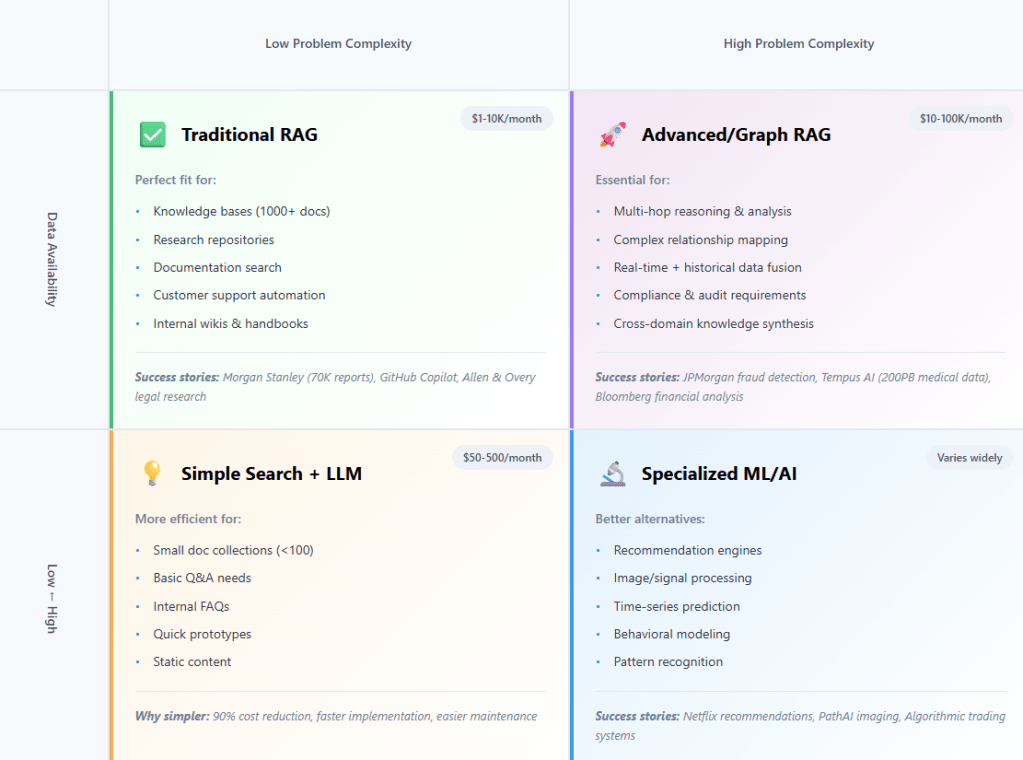
🎯 The AI Decision Matrix
🔑 The Key Insight
“RAG isn’t magic. It’s engineering.”
And like all engineering decisions, success depends on matching the solution to the problem, not the other way around. The companies generating billions from AI didn’t start with perfect RAG. They started with clear problems and built solutions that fit.
📊 When RAG Makes Sense: The Success Patterns
✅ Perfect RAG Use Cases:
Large knowledge repositories (1,000+ documents) requiring semantic search
Expert knowledge systems where context and nuance matter
Compliance-heavy domains needing traceable answers with citations
Dynamic information that updates frequently but needs historical context
Multi-source synthesis combining internal and external data
❌ When to Look Elsewhere:
Structured data problems (use SQL/traditional databases)
Pure pattern matching (use specialized ML models)
Real-time sensor data (use streaming analytics)
Small, static datasets (use simple search)
Recommendation systems (use collaborative filtering)
The revolution isn’t about RAG everywhere—it’s about RAG where it matters.
📝 THE REALITY CHECK – “When RAG Wins (And When It Doesn’t)”
The Three Scenarios
💸 Scenario A: RAG Was Overkill
“The $15,000 Monthly Mistake”
The Case: Startup Burning Cash on Vector Databases
Meet TechFlow, a 25-person SaaS startup that convinced themselves they needed enterprise-grade RAG. Their use case? A company knowledge base with exactly 97 documents—employee handbook, product specs, and some technical documentation.
Their “AI-first” CTO installed the full stack:
🗄️ Pinecone Pro: $8,000/month
🤖 OpenAI API costs: $4,000/month
☁️ AWS infrastructure: $2,500/month
👨💻 Two full-time ML engineers: $30,000/month combined
Total monthly burn: $44,500 for what should have been a $200 problem.
The Better Solution: Simple Search + GPT-3.5
What they actually needed:
Elasticsearch (free tier): $0
GPT-3.5-turbo API: $50/month
Simple web interface: 2 days of dev work
Total cost: $50/month (99.8% cost reduction)
The tragic irony? Their $50 solution delivered faster responses and better user experience than their over-engineered RAG stack.
The Lesson: “Don’t Use a Ferrari for Grocery Shopping”
Warning Sign: If your document count has fewer digits than your monthly AI bill, you’re probably over-engineering.
🏆 Scenario B: RAG Was Perfect
“The Morgan Stanley Success Story”
The Case: 70,000 Research Reports, 40,000 Employees
Morgan Stanley faced a genuine needle-in-haystack problem:
📚 70,000+ proprietary research reports spanning decades
👥 40,000 employees (50% of workforce) needing instant access
Traditional search was failing catastrophically. Investment advisors spent hours hunting for the right analysis while clients waited.
Why RAG Won: The Perfect Storm of Requirements
✅ Large Corpus: 70K documents = semantic search essential ✅ Expert Knowledge: Financial analysis requires nuanced understanding ✅ Real-time Updates: Market conditions change by the minute ✅ User Scale: 40K employees = infrastructure investment justified ✅ High-Value Use Case: Faster client responses = millions in revenue
The Architecture: Hybrid Search + Re-ranking + Custom Training
Financial Reports
→ Domain-specific embedding model → Vector database (semantic search) + Traditional search (exact terms) → Cross-encoder re-ranking → GPT-4 with financial training → Contextual response with citations
The Results: Transformational Impact
⚡ Response time: Hours → Seconds
📈 User adoption: 50% of entire workforce
⏰ Time savings: 15 hours per week per employee
💰 ROI: Multimillion-dollar productivity gains
🩺 Scenario C: RAG Wasn’t Enough
“The Medical Diagnosis Reality Check”
The Case: Real-time Patient Monitoring
MedTech Innovation wanted to build an AI diagnostic assistant for ICU patients. Their initial plan? Pure RAG querying medical literature based on patient symptoms.
⏰ Temporal patterns: Symptom progression over time
🧬 Genetic factors: Patient-specific risk profiles
RAG could handle the medical literature lookup, but 90% of the diagnostic value came from real-time data analysis that required specialized ML pipelines.
The Better Solution: Specialized ML Pipeline with RAG as Component
Real-time sensors → Time-series ML models → Risk scoring ↓ Historical EHR → Pattern recognition → Trend analysis ↓ Symptoms + vitals → RAG medical literature → Evidence synthesis ↓ Combined AI reasoning → Diagnostic suggestions + Literature support
The Lesson: “RAG is a Tool, Not a Complete Solution”
RAG became one valuable component in a larger AI ecosystem, not the centerpiece. The startup’s pivot to this architecture secured $12M Series A funding and FDA breakthrough device designation.
📊 Business Impact Spectrum
Solution Type
Implementation Cost
Monthly Operating
Typical ROI Timeline
Sweet Spot Use Cases
Simple Search + LLM
$5K-15K
$50-500
1-2 months
<100 docs, internal FAQs
Traditional RAG
$15K-50K
$1K-10K
3-6 months
1K+ docs, expert knowledge
Advanced RAG
$50K-200K
$10K-100K
6-12 months
Complex reasoning, compliance
Custom ML + RAG
$200K+
$100K+
12+ months
Mission-critical, specialized domains
“60% of ‘RAG projects’ don’t need RAG—they need better search.”
The uncomfortable truth from three years of production deployments: Most organizations rush to RAG because it sounds sophisticated, when their real problem is that their existing search is terrible.
The $50M boardroom lesson? Before building RAG, audit what you already have. That “innovative AI transformation” might just be a well-configured Elasticsearch instance away.
Next up: For the 40% of cases where RAG is the right answer, let’s examine how industry leaders actually architect these systems—and the patterns that separate billion-dollar successes from expensive failures.
🏗️ THE NEW ARCHITECTURES – “How Industry Leaders Actually Build RAG”
🏗️ The Evolution in Practice
The boardroom fantasy of “plug-and-play RAG” died quickly in 2024. What emerged instead were three distinct architectural patterns that separate billion-dollar successes from expensive failures. These aren’t theoretical frameworks—they’re battle-tested systems processing petabytes of data and serving millions of users daily.
The evolution follows a clear trajectory: from generic chatbots to domain-specific intelligence engines that understand context, relationships, and real-time requirements. The winners didn’t just implement RAG—they architected RAG ecosystems tailored to their specific business challenges.
🧬 Pattern 1: The Hybrid Intelligence Model
“When RAG Meets Specialized ML”
Tempus AI – Precision Medicine at Scale
Tempus AI didn’t just build a medical RAG system—they created a hybrid intelligence platform that processes 200+ petabytes of multimodal clinical data while serving 65% of US academic medical centers.
The challenge was existential: cancer research requires understanding temporal relationships (how treatments evolve), spatial patterns (tumor progression), and literature synthesis (latest research findings). Pure RAG couldn’t handle the temporal aspects. Pure ML couldn’t synthesize research literature. The solution? Architectural fusion.
🗄️ Graph Databases for patient relationship mapping:
Patient A → Similar genetic profile → Patient B → Successful treatment path → Protocol C → Literature support → Study XYZ
🔍 Vector Search for literature matching:
Custom biomedical embeddings trained on 15+ million pathologist annotations
Cross-modal retrieval linking pathology images to clinical outcomes
Real-time integration with PubMed and clinical trial databases
📊 Time-Series Databases for temporal pattern recognition:
Treatment response tracking over months/years
Biomarker progression analysis
Survival outcome prediction models
The Business Breakthrough
📈 Revenue Results:
$693.4M revenue in 2024 (79% growth projected for 2025)
$8.5B market valuation driven by AI capabilities
5 percentage point increase in clinical trial success probability for pharma partners
The hybrid approach solved what pure RAG couldn’t: context-aware medical intelligence that understands both current patient state and historical patterns.
💰 Pattern 2: The Domain-Specific Specialist
“When Generic Models Hit Their Limits”
Bloomberg’s Financial Intelligence Engine
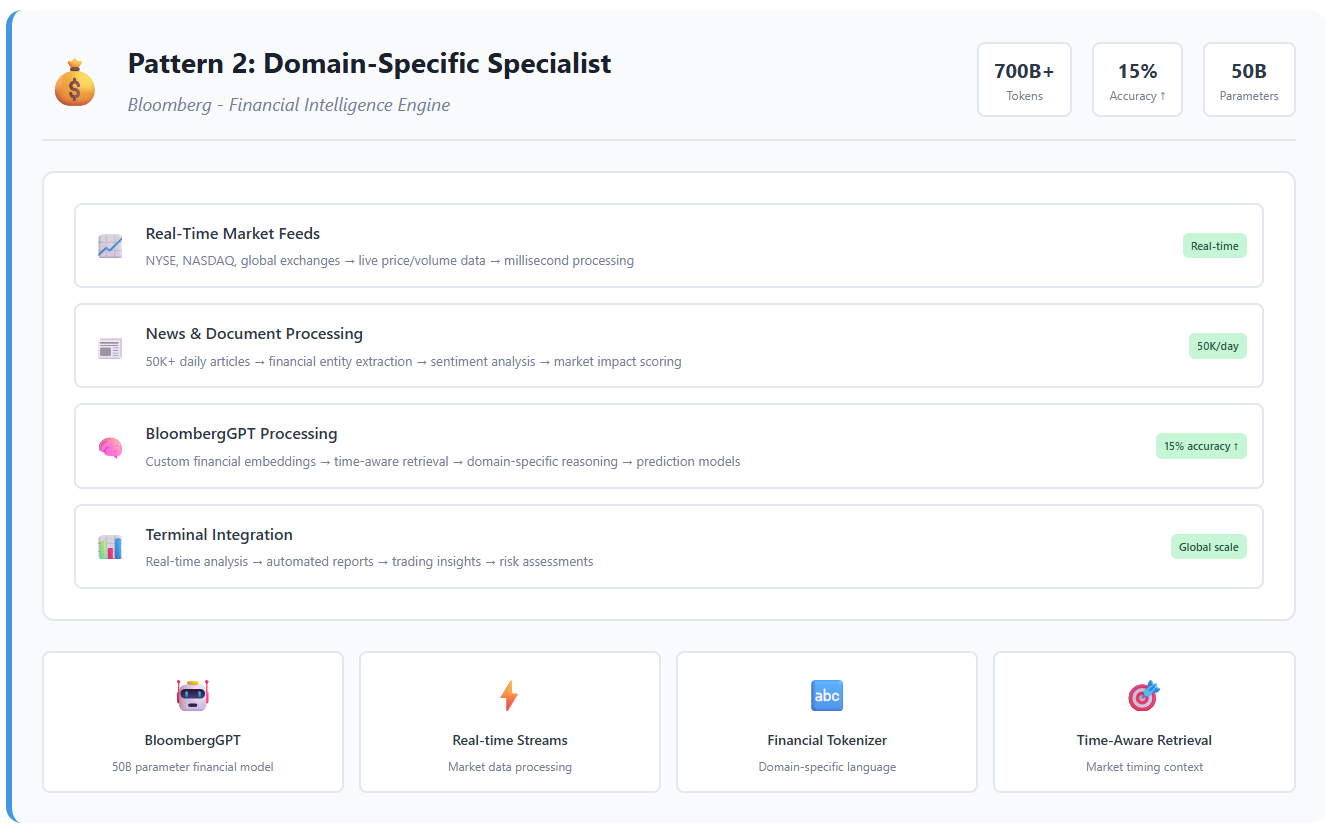
Bloomberg faced a problem that perfectly illustrates why generic RAG fails at enterprise scale. Financial markets generate 50,000+ news items daily, while their 50-billion parameter BloombergGPT needed to process 700+ billion financial tokens with millisecond-accurate timing.
The insight: financial language isn’t English. Terms like “tight spreads,” “flight to quality,” and “basis points” have precise meanings that generic models miss. Bloomberg’s solution? Complete domain specialization.
Bloomberg’s domain-specific approach created a defensive moat—competitors can’t replicate without similar financial data access and domain expertise.
🛡️ Pattern 3: The Modular Enterprise Platform
“When Security and Scale Both Matter”
JPMorgan’s Fraud Detection Ecosystem
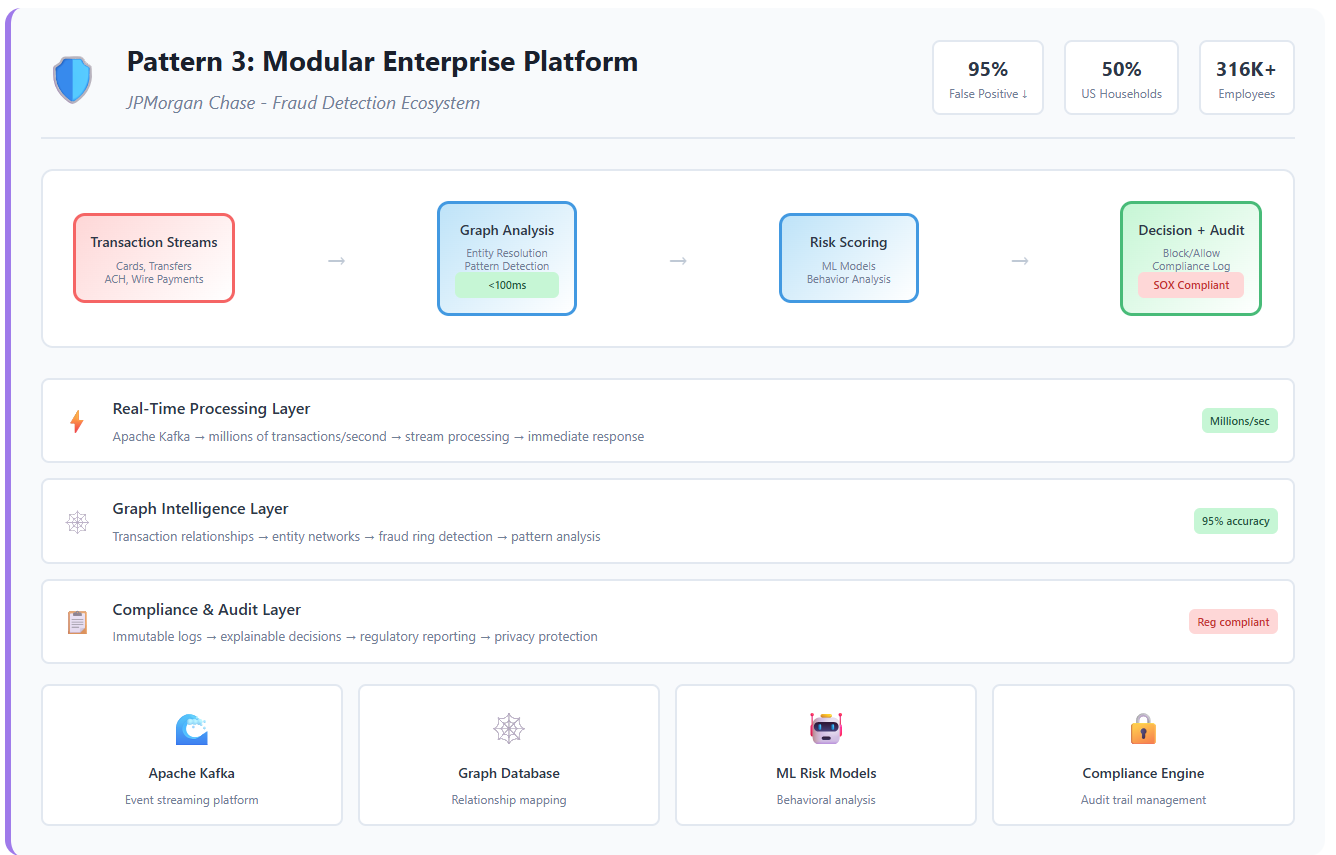
JPMorgan Chase protects transactions for nearly 50% of American households—a scale that demands both real-time processing and regulatory compliance. Their challenge: detect fraudulent patterns across millions of daily transactions while maintaining audit trails for regulators.
The solution combined GraphRAG (for relationship analysis), streaming architectures (for real-time detection), and compliance layers (for regulatory requirements) into a unified platform.
🕸️ Graph Databases for transaction relationship mapping:
Account A → transfers to → Account B → similar patterns → Known fraud ring → geographic proximity → High-risk location → time correlation → Suspicious timing
⚡ Real-Time Processing for immediate detection:
Event streaming via Apache Kafka processing millions of transactions/second
In-memory graph updates for instant relationship analysis
ML model inference with <100ms latency requirements
📋 Compliance Layers for regulatory requirements:
Immutable audit trails for every decision
Explainable AI outputs for regulatory review
Privacy-preserving analytics for cross-bank fraud detection
The Security + Scale Achievement
🎯 Risk Reduction Results:
95% reduction in false positives for AML detection
15-20% reduction in account validation rejection rates
Real-time protection for 316,000+ employees across business units
JPMorgan’s modular approach enables component-wise scaling—they can upgrade fraud detection algorithms without touching compliance systems.
🎯 Key Pattern Recognition
The Meta-Pattern Behind Success
Analyzing these three leaders reveals the architectural DNA of successful RAG:
🧩 Domain Expertise + Custom Data + Right Architecture
Tempus: Medical expertise + clinical data + hybrid ML-RAG
Bloomberg: Financial expertise + market data + domain-specific models
JPMorgan: Banking expertise + transaction data + modular compliance
🚫 Generic Solutions Rarely Scale to Enterprise Needs
The companies spending $15K/month on Pinecone for 100 documents are missing the point. Enterprise RAG isn’t about better search—it’s about business-specific intelligence that understands domain context, relationships, and real-time requirements.
💎 Business Value Comes from the Combination, Not Individual Components
Tempus’s value isn’t from GraphRAG alone—it’s GraphRAG + time-series analysis + medical literature
Bloomberg’s advantage isn’t just custom embeddings—it’s embeddings + real-time data + financial reasoning
But the defensive moats they create justify the investment. Competitors can’t simply copy the architecture—they need the domain expertise, data relationships, and operational scale.
📊 Pattern Comparison Matrix
Pattern
Investment Level
Time to Value
Defensive Moat
Best For
Hybrid Intelligence
$10M+
12-18 months
Very High
Multi-modal domains
Domain Specialist
$5M+
6-12 months
High
Industry-specific expertise
Modular Enterprise
$20M+
18-24 months
Extremely High
Regulated industries
Success Indicators
Clear domain expertise within the organization
Proprietary data sources that competitors can’t access
Specific business metrics that RAG directly improves
Executive support for multi-year architectural investments
🔨 THE COMPONENT MASTERY – “Best Practices That Actually Work”
🧭 The Five Critical Decisions
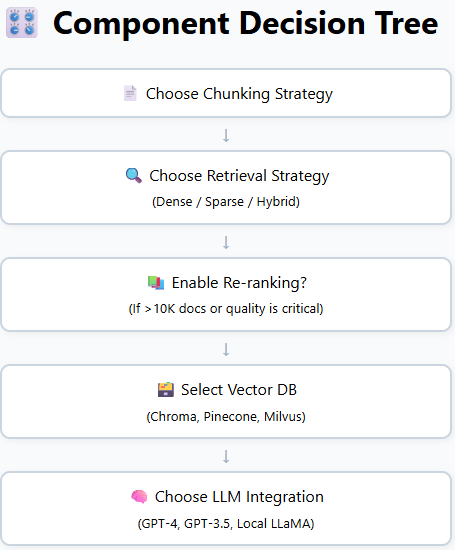
The leap from proof-of-concept to production-grade RAG hinges on five architectural decisions. Get these wrong, and even the most sophisticated stack will flounder. Get them right—and you build defensible moats, measurable ROI, and scalable AI intelligence. Let’s walk through the five decisions that separate billion-dollar deployments from costly experiments.
🧩 Decision 1: Chunking Strategy – “The Foundation Everything Builds On”
❌ Naive Approach: Fixed 512-token chunks
Failure rate: Up to 70% in enterprise-scale deployments
🔎 Decision 2: Retrieval Strategy – “Dense vs. Sparse vs. Hybrid”
⚖️ The Trade-off
Dense: Captures semantics
Sparse: Captures exact terms
Hybrid: Captures both
🧪 Benchmark: Microsoft GraphRAG
Hybrid retrieval outperforms naive dense or sparse by 70–80% in answer quality
🧠 When to Use What
Use Case
Strategy
Semantic similarity
Dense only
Legal citations, audits
Sparse only
Enterprise Q&A
Hybrid
⚖️ Real Example: LexisNexis AI Legal Assistant
Dense: Interprets legal concepts
Sparse: Matches citations and jurisdictions
Outcome: Millions of documents retrieved with 80% user adoption
📚 Decision 3: Re-ranking – “The 20% Effort for 40% Improvement”
🎯 The ROI Case
Tool: Cohere Rerank / Cross-encoders
Precision Gain: +25–35%
Cost: ~$100/month at moderate scale
🤖 When to Use It
Corpus >10,000 docs
Answer quality is critical
Legal, healthcare, financial use cases
🔁 What It Looks Like
Top-20 retrieved → Reranked with cross-encoder → Top-5 fed to LLM
🏦 Worth It?
For systems like Morgan Stanley’s assistant or Tempus AI’s medical engine—absolutely
🗃️Vector Database Selection – “Performance vs. Cost Reality”
📊 Scale Thresholds
Scale
DB Recommendation
Notes
<1M vectors
ChromaDB
Free, in-memory or local
1M–100M
Pinecone / Weaviate
Managed, scalable
100M+
Milvus
High-perf, enterprise
💸 Hidden Costs
Index rebuild time
Metadata filtering limits
Multi-tenant isolation complexity
🧮 Real Decision Matrix
Data size → Retrieval latency need → Security/privacy → Budget → DB choice
🧠 Decision 5: LLM Integration – “Quality vs. Cost Optimization”
🪜 The Model Ladder
Task
LLM Choice
Notes
Complex reasoning
GPT-4/Gemini pro
Best in class, expensive
High volume Q&A
GPT-4.1 nano / Gemeni Flash
10x cheaper, good baseline
Privacy-sensitive
LLaMA / Mistral / Qwen
Local deployment, cost-effective
📉 Performance vs. Cost
Component
Basic Setup Cost
Scaled Cost
Performance Gain
Chunking Upgrade
$0 → $2K
$5K
20–40%
Re-ranking
$100/month
$1K/month
30%
Vector DB
$0 (Chroma)
$10K–50K
0–10% (if tuned)
LLM Optimization
$500–$50K
$100K+
10–90%
RAG isn’t won at the top—it’s won in the components. The best systems don’t just choose good tools; they make the right combination decisions at every layer.
The 20% of technical decisions that drive 80% of business impact? They’re all here.
🚀THE SCALABILITY PATTERNS – “From Prototype to Production”
A weekend hack is enough to prove that RAG works. Scaling the same idea so thousands of people can rely on it every hour is a different game entirely. Teams that succeed learn to tame three dragons—data freshness, security, and quality—without slowing the system to a crawl or blowing the budget. What follows is not a checklist; it is the lived experience of companies that had to keep their models honest, their data safe, and their users happy at scale.
⚡ Challenge 1 — Data Freshness
“Yesterday’s knowledge is today’s liability.”
Most early-stage RAG systems treat the vector index like a static library: load everything once, then read forever. That illusion shatters the first time a customer asks about something that changed fifteen minutes ago. Staleness creeps in quietly—at first a wrong price, then a deprecated API, eventually a flood of outdated answers that erodes trust.
The industrial-strength response is a real-time streaming architecture. Incoming events—whether they are Git commits, product-catalog updates, or breaking news—flow through Kafka or Pulsar, pick up embeddings in-flight via Flink or Materialize, and land in a vector store that supports lock-free upserts. The index never “rebuilds”; it simply grows and retires fragments in near-real time. Amazon’s ad-sales intelligence team watched a two-hour ingestion lag shrink to seconds, which in turn collapsed campaign-launch cycles from a week to virtually instant.
“Just because the model can retrieve it doesn’t mean the user should see it.”
In production, every query carries a security context: Who is asking? What are they allowed to read? A marketing intern and a CFO might type identical questions yet deserve different answers. Without enforcement the model becomes a leaky sieve—and your compliance officer’s worst nightmare.
Mature systems solve this with metadata-filtered retrieval backed by fine-grained RBAC. During ingestion, every chunk is stamped with attributes such as tenant_id, department, or privacy_level. At query time, the retrieval call is paired with a policy check—often via Open Policy Agent—that injects an inline filter (WHERE tenant_id = "acme"). The LLM never even sees documents outside the caller’s scope, so accidental leakage is impossible by construction. Multi-tenant SaaS vendors rely on this pattern to host thousands of customers in a single index while passing rigorous audits.
🧪 Challenge 3 — Quality Assurance
“A 1% hallucination rate at a million requests per day is ten thousand problems.”
Small pilots survive the occasional nonsense answer. Public-facing or mission-critical systems do not. As query volume climbs, even rare hallucinations turn into support tickets, regulatory incidents, or—worst of all—patient harm.
The fix is a layered validation pipeline. First, a cross-encoder or reranker re-scores the candidate passages so the LLM starts from stronger evidence. After generation, a second, cheaper model—often GPT-3.5 with a strict rubric—grades the draft for relevance, factual grounding, and policy compliance. Answers that fail the rubric are either regenerated with a different prompt or routed to a human reviewer. In healthcare deployments the review threshold is aggressive: any answer below, say, 0.85 confidence is withheld until a clinician approves it, and every interaction is written to an immutable audit log. This may add a few hundred milliseconds, but it prevents weeks of damage control later.
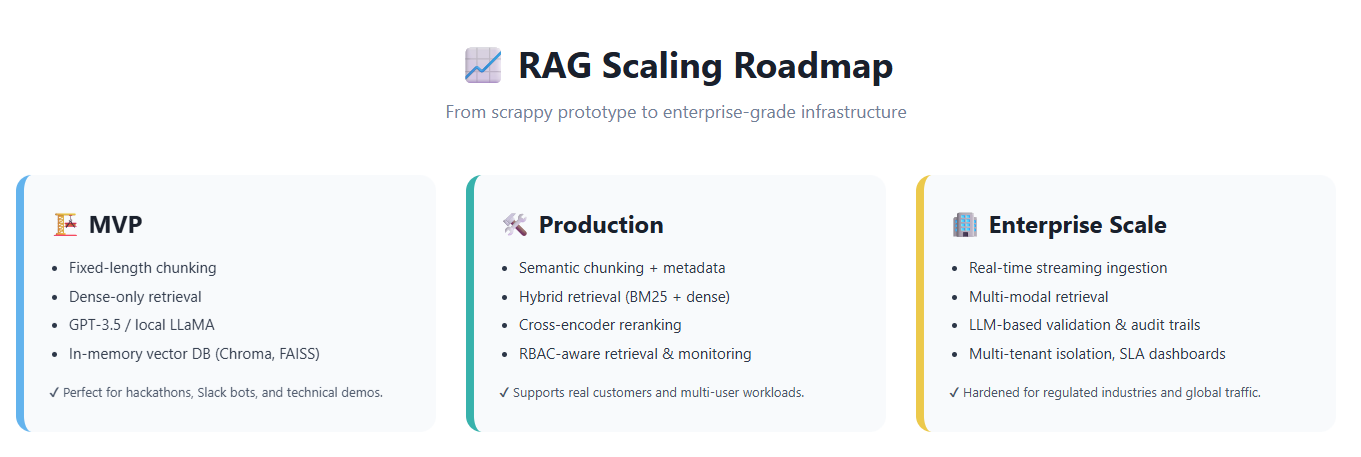
📈 The RAG Scaling Roadmap
Every production journey hits the same milestones, even if the signage looks different from one company to the next.
MVP – “Prove it works.” A handful of documents, fixed-length chunks, dense retrieval only, GPT-3.5 or a local LLaMA. Everything fits in Chroma or FAISS on a single box. Ideal for hackathons, Slack bots, and stakeholder demos.
Production – “Users rely on it.” Semantic or structure-aware chunking replaces naïve splits. Hybrid retrieval (BM25 + vectors) and reranking raise precision. Metadata filters enforce permissions. Monitoring dashboards appear because somebody has to show uptime at the all-hands.
Enterprise Scale – “This is critical infrastructure.” Data arrives as streams, embeddings are minted in real time, and the index updates without downtime. Multi-modal retrieval joins text with images, tables, or logs. Validation steps grade every answer; suspicious ones escalate. Cost dashboards, usage quotas, and SLA alerts become as important as model accuracy.
Scaling RAG is not an exercise in adding GPUs—it is an exercise in adding discipline. Fresh data, enforced permissions, continuous validation: miss any one and the whole tower lists.
If your system is drifting, it is rarely the fault of the LLM. Look first at the pipeline: are yesterday’s documents still in charge, are permissions porous, or are bad answers slipping through unchecked? Solve those, and the same model that struggled at one hundred users will thrive at one million.
🔮THE EMERGING FRONTIER – “What’s Coming Next”
🌌 The Next Horizon
The future isn’t waiting—it’s already here. Three emerging trends are reshaping the Retrieval-Augmented Generation landscape, and by 2026, the early adopters will have set the new benchmarks. Here’s what you need to watch.
🚀 Three Game-Changing Trends
🤖 Trend 1 — Agentic RAG: Smart Retrieval on Demand
What: Intelligent agents autonomously determine what information to fetch and how best to retrieve it.
Example: A strategic consulting assistant plans multi-step data retrieval — “Fetch Piper’s ESG 2024 report, validate against CDP carbon figures, and highlight controversial media insights.”
Why it Matters: Dramatically reduces token usage, enhances accuracy, and significantly accelerates research workflows.
Timeline: Pilot projects active → Early adoption expected 2025 → Mainstream by 2026
🖼️ Trend 2 — Multimodal Fusion: Breaking the Boundaries of Text
What: Unified retrieval across text, images, audio, and structured data.
Example: PathAI integrates medical imaging with clinical notes and genomic data into a single analytic pass.
Why it Matters: Eliminates domain-specific silos, enabling models to concurrently “see,” “hear,” and “read.”
Timeline: Specialized use cases live now → General-purpose SDKs by mid-2025
⚡ Trend 3 — Real-Time Everything: Instant Information Flow
What: Streaming ingestion, real-time embeddings, and instant query responsiveness.
Example: Financial copilots merge market tick data, Fed news, and social sentiment within milliseconds.
Why it Matters: Turns RAG into a live decision support layer, not just a passive archive searcher.
Timeline: Already deployed in finance and ad-tech → Expanding to consumer apps next
💡 Strategic Investment Guidance
Horizon
Prioritize Adoption
Optimize Current Capabilities
Consider Delaying
0–6 months
Real-time metadata streaming
Chunking refinements, hybrid retrieval
Early agentic workflows
6–18 months
Pilot agentic use-cases
Multimodal POCs
Full-scale multimodal overhauls
18–36 months
Agent frameworks at scale
—
Replace aging RAG 1.0 infrastructure
🏁THE FINAL INSIGHT – “The Meta-Pattern Behind Success”
🧠 The Universal Architecture of Winning RAG Systems
Across industries and use cases—from finance to medicine, legal to logistics—the same pattern keeps emerging.
Success doesn’t come from having the flashiest model or the biggest vector database. It comes from the right combination of four ingredients:
You can’t outsource understanding. Every breakthrough case—Morgan Stanley’s advisor tool, Bloomberg’s financial brain, Tempus’s clinical intelligence—started with one hard-won insight: “Build RAG around the problem, not the other way around.”
“RAG success isn’t about technology—it’s about understanding your business problem deeply enough to choose the right solution.”
💼 The Strategic Play
Want to build a billion-dollar RAG system? Don’t start by picking tools. Start by asking questions:
What type of knowledge do users need?
What is the cost of a wrong answer?
Where does context come from—history, hierarchy, real-time data?
What decision is this system actually supporting?
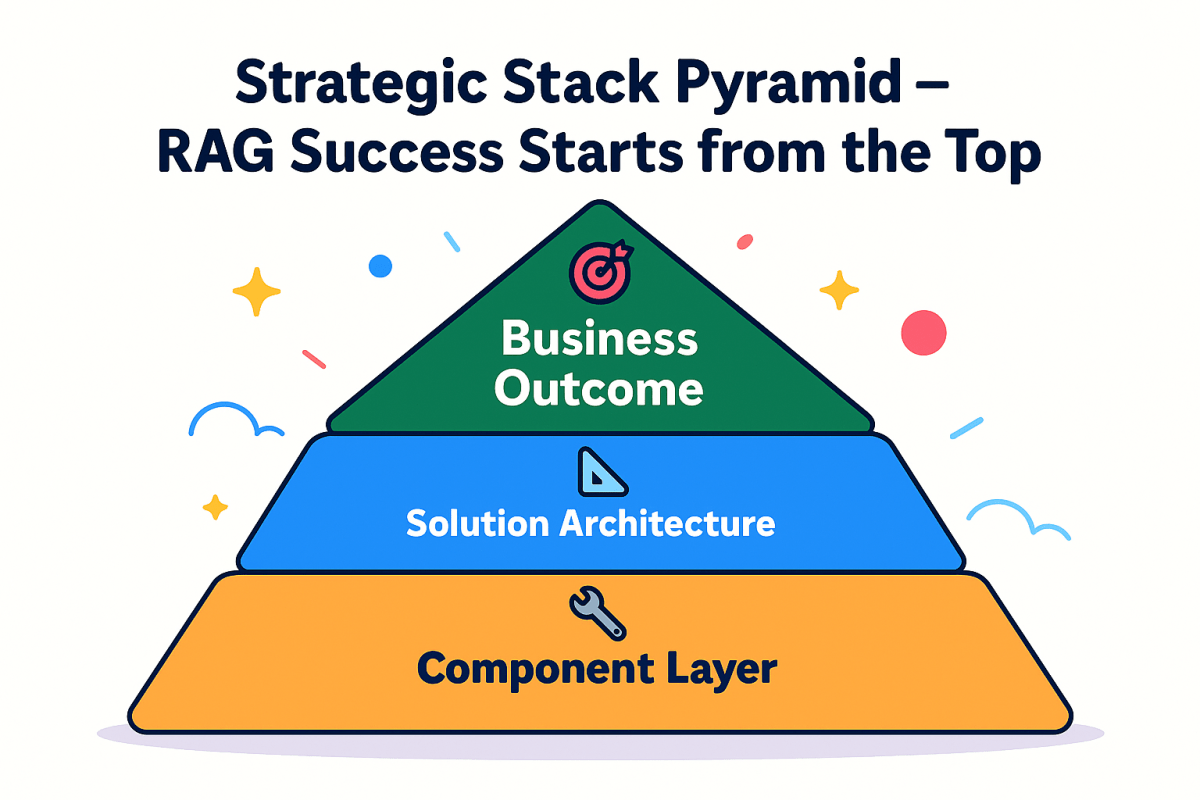
From there, design your stack backward—from outcome → to architecture → to components.
“The companies generating billions from AI didn’t start with perfect RAG. They started with clear problems and built solutions that fit.”
🔑 The One Thing to Remember
If you take away just one insight from this exploration of RAG architectures, let it be this:
RAG isn’t magic. It’s engineering.
And like all engineering, success comes from matching the solution to the problem—not forcing problems to fit your favorite solution. The $50 million question isn’t “How do we implement RAG?” It’s “What problem are we actually trying to solve?”
Answer that honestly, and you’re already ahead of 60% of AI initiatives.
The revolution continues—but now you know which battles are worth fighting.
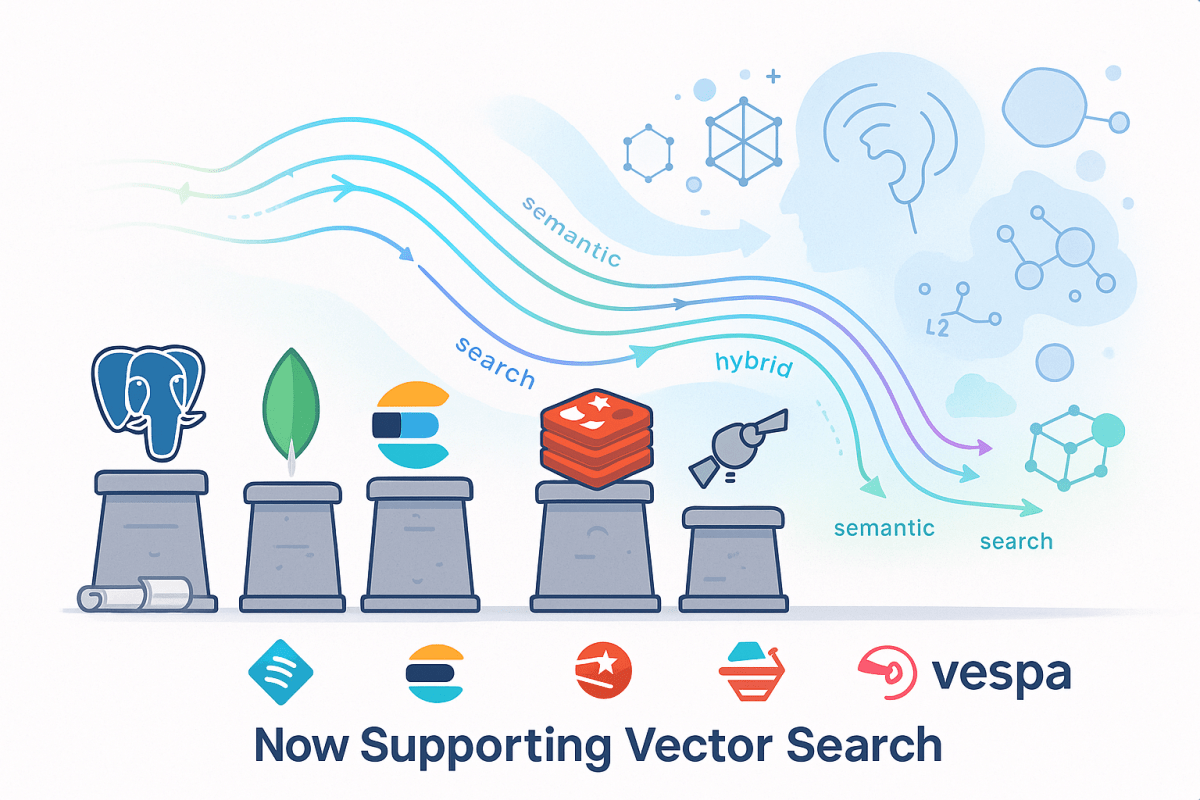
As artificial intelligence and large language models redefine how we work with data, a new class of database capabilities is gaining traction: vector search. In our previous post, we explored specialized vector databases like Pinecone, Weaviate, Qdrant, and Milvus — purpose-built to handle high-speed, large-scale similarity search. But what about teams already committed to traditional databases?
The truth is, you don’t have to rebuild your stack to start benefiting from vector capabilities. Many mainstream database vendors have introduced support for vectors, offering ways to integrate semantic search, hybrid retrieval, and AI-powered features directly into your existing data ecosystem.
This post is your guide to understanding how traditional databases are evolving to meet the needs of semantic search — and how they stack up against their vector-native counterparts.
Why Traditional Databases Matter in the Vector Era
Specialized tools may offer state-of-the-art performance, but traditional databases bring something equally valuable: maturity, integration, and trust. For organizations with existing investments in PostgreSQL, MongoDB, Elasticsearch, Redis, or Vespa, the ability to add vector capabilities without replatforming is a major win.
These systems enable hybrid queries, mixing structured filters and semantic search, and are often easier to secure, audit, and scale within corporate environments.
Let’s look at each of them in detail — not just the features, but how they feel to work with, where they shine, and what you need to watch out for.
The pgvector extension brings vector types and similarity search into the core of PostgreSQL. It’s the fastest path to experimenting with semantic search in SQL-native environments.
Vector fields up to 16k dimensions
Cosine, L2, and dot product similarity
GIN and IVFFlat indexing (HNSW via 3rd-party)
SQL joins and hybrid queries supported
AI-enhanced dashboards and BI
Internal RAG pipelines
Private deployments in sensitive industries
Great for small-to-medium workloads. With indexing, it’s usable for production — but not tuned for web-scale.
Advantages
Weaknesses
Familiar SQL workflow
Slower than vector-native DBs
Secure and compliance-ready
Indexing options are limited
Combines relational + semantic data
Requires manual tuning
Open source and widely supported
Not ideal for streaming data
Thoughts: If you already run PostgreSQL, pgvector is a no-regret move. Just don’t expect deep vector tuning or billion-record speed.
Elasticsearch, the king of full-text search, now supports vector similarity with the KNN plugin. It’s a hybrid powerhouse when keyword relevance and embeddings combine.
ANN search using HNSW
Multi-modal queries (text + vector)
Built-in scoring customization
E-commerce recommendations
Hybrid document search
Knowledge base retrieval bots
Performs well at enterprise scale with the right tuning. Latency is higher than vector-native tools, but hybrid precision is hard to beat.
Advantages
Weaknesses
Text + vector search in one place
HNSW-only method
Proven scalability and monitoring
Java heap tuning can be tricky
Custom scoring and filters
Not optimized for dense-only queries
Thoughts: If you already use Elasticsearch, vector search is a logical next step. Not a pure vector engine, but extremely versatile.
Vespa is a full-scale engine built for enterprise search and recommendations. With native support for dense and sparse vectors, it’s a heavyweight in the semantic search space.
Dense/sparse hybrid support
Advanced filtering and ranking
Online learning and relevance tuning
Media or news personalization
Context-rich enterprise search
Custom search engines with ranking logic
One of the most scalable traditional engines, capable of handling massive corpora and concurrent users with ease.
Advantages
Weaknesses
Built for extreme scale
Steeper learning curve
Sophisticated ranking control
Deployment more complex
Hybrid vector + metadata + rules
Smaller developer community
Thoughts: Vespa is an engineer’s dream for large, complex search problems. Best suited to teams who can invest in custom tuning.
Summary: Which Path Is Right for You?
Database
Best For
Scale Suitability
PostgreSQL
Existing analytics, dashboards
Small to medium
MongoDB
NoSQL apps, fast product prototyping
Medium
Elasticsearch
Hybrid search and e-commerce
Medium to large
Redis
Real-time personalization and chat
Small to medium
Vespa
News/media search, large data workloads
Enterprise-scale
Final Reflections
Traditional databases may not have been designed with semantic search in mind — but they’re catching up fast. For many teams, they offer the best of both worlds: modern AI capability and a trusted operational base.
As you plan your next AI-powered feature, don’t overlook the infrastructure you already know. With the right extensions, traditional databases might surprise you.
In our next post, we’ll explore real-world architectures combining these tools, and look at performance benchmarks from independent tests.
Stay tuned — and if you’ve already tried adding vector support to your favorite DB, we’d love to hear what worked (and what didn’t).



 Tellian