As businesses increasingly adopt Retrieval-Augmented Generation (RAG) to power intelligent applications, a specialized market of platforms known as “RAG as a Service” (RaaS) has rapidly matured. These services aim to abstract away the significant engineering challenges involved in building, deploying, and maintaining a production-ready RAG system.
However, the landscape is not limited to commercial, managed services. A vibrant ecosystem of open-source, self-hostable platforms has emerged, offering a compelling alternative for organizations that require greater control, data sovereignty, and deeper customization. These solutions provide a strategic middle ground between building from scratch with frameworks like LangChain and buying a proprietary, “black box” service.
This article provides a comprehensive overview of the modern RAG landscape, comparing leading commercial RaaS providers with their powerful open-source counterparts to help you choose the right path for your project.
Commercial RaaS Platforms: Managed for Speed and Simplicity
Commercial RaaS platforms are designed to deliver value with minimal setup. They offer end-to-end managed services that handle the underlying complexity of data ingestion, vectorization, and secure deployment, allowing development teams to focus on application logic.
🎯 Vectara: The Accuracy-Focused Engine
Product Overview: Vectara is an end-to-end cloud platform that puts a heavy emphasis on minimizing hallucinations and providing verifiable, fact-grounded answers. It operates as a fully managed service, using its own suite of proprietary AI models engineered for retrieval accuracy and factual consistency.
Architectural Approach:
- Grounded Generation: A core design principle is forcing generated answers to be based strictly on the provided documents, complete with inline citations to ensure verifiability.
- Proprietary Models: It uses specialized models like the HHEM (Hallucination Evaluation Model), which acts as a real-time fact-checker, to improve the reliability of its outputs.
- Black Box Design: The platform is intentionally a “black box,” abstracting away the internal components to deliver high accuracy out-of-the-box, at the expense of granular customizability.
Well-Suited For: Enterprise applications where factual precision is a non-negotiable requirement, such as internal policy chatbots, financial reporting tools, or customer support systems dealing with technical information.
🛡️ Nuclia: The Security-First Fortress
Product Overview: Nuclia is an all-in-one RAG platform distinguished by its focus on Security & Governance. Its standout feature is the option for on-premise deployment, which allows enterprises to maintain full control over sensitive data.
Architectural Approach:
- Data Sovereignty: The ability to run the entire platform within a company’s own firewall is its main differentiator, making it ideal for data-sensitive environments.
- Versatile Data Processing: It is engineered to process a wide range of unstructured data, including video, audio, and complex PDFs, making them fully searchable.
- Certified Security: The platform adheres to high security standards like SOC 2 Type II and ISO 27001, providing enterprise-grade assurance.
Well-Suited For: Organizations in highly regulated industries (e.g., finance, legal, healthcare) or those handling sensitive R&D data that cannot be exposed to a public cloud environment.
🚀 Ragie: The Developer-Centric Launchpad
Product Overview: Ragie is a fully-managed RAG platform designed for developer velocity and ease of use. It aims to lower the barrier to entry for building RAG applications by providing simple APIs and a large library of pre-built connectors.
Architectural Approach:
- Managed Connectors: A key feature is its library of connectors that automate data syncing from sources like Google Drive, Notion, and Confluence, reducing integration overhead.
- Accessible Features: It packages advanced capabilities like multimodal search and reranking into all its plans, including a free tier, to encourage rapid prototyping.
- Simplicity over Control: It is designed for ease of use, which means it offers less granular control over internal components like chunking algorithms or underlying LLMs.
Well-Suited For: Startups and development teams that need to build and launch RAG applications quickly and cost-effectively, especially for prototypes, MVPs, or less critical internal tools.
🛠️ Ragu AI: The Modular Workshop
Product Overview: Ragu AI operates more like a flexible framework than a closed system. It emphasizes modularity and control, allowing expert teams to assemble a bespoke RAG pipeline using their own preferred components.
Architectural Approach:
- Bring Your Own Components (BYOC): Its core philosophy is integration. Users can plug in their own vector database (e.g., Pinecone), LLMs, and other tools, giving them full control over the stack.
- Pipeline Optimization: It provides tools for A/B testing different pipeline configurations, enabling teams to empirically tune the system for their specific needs.
- Orchestration Layer: It acts as a managed orchestration layer that connects to a company’s existing infrastructure, avoiding the need for large-scale data migration.
Well-Suited For: Experienced AI/ML teams building sophisticated, custom RAG solutions that require deep integration with existing data stacks or the use of specific, fine-tuned models.
Open-Source RAG Platforms: Built for Control and Customization
Open-source platforms offer a powerful alternative for teams that require full data sovereignty, architectural control, and the ability to customize their RAG pipeline. These are not just libraries; they are complete, deployable application stacks.
🧩 Dify.ai: The Visual AI Application Development Platform
Product Overview: Dify.ai is a comprehensive, open-source LLM application development platform that extends beyond RAG to encompass a wide range of agentic AI applications. Its low-code/no-code visual interface democratizes AI development for a broad audience.
Architectural Approach:
- Visual Workflow Builder: Its centerpiece is an intuitive, drag-and-drop canvas for constructing, testing, and deploying complex AI workflows and multi-step agents without extensive coding.
- Integrated RAG Engine: Includes a powerful, built-in RAG pipeline that manages the entire lifecycle of knowledge augmentation, from document ingestion and parsing to advanced retrieval strategies.
- Backend-as-a-Service (BaaS): Provides a complete set of RESTful APIs, allowing developers to programmatically integrate Dify’s backend into their own custom applications.
Well-Suited For: Cross-functional teams (Product Managers, Developers, Marketers) that need to rapidly build, prototype, and deploy AI-powered applications, including RAG chatbots and complex agents.
📚 RAGFlow: The Deep Document Understanding Engine
Product Overview: RAGFlow is an open-source RAG platform singularly focused on solving “deep document understanding.” Its philosophy is that RAG system performance is limited by the quality of data extraction, especially from complex, unstructured formats.
Architectural Approach:
- Template-Based Chunking: A key differentiator is its use of customizable visual templates for document chunking, allowing for more logical and contextually aware segmentation of complex layouts (e.g., multi-column PDFs).
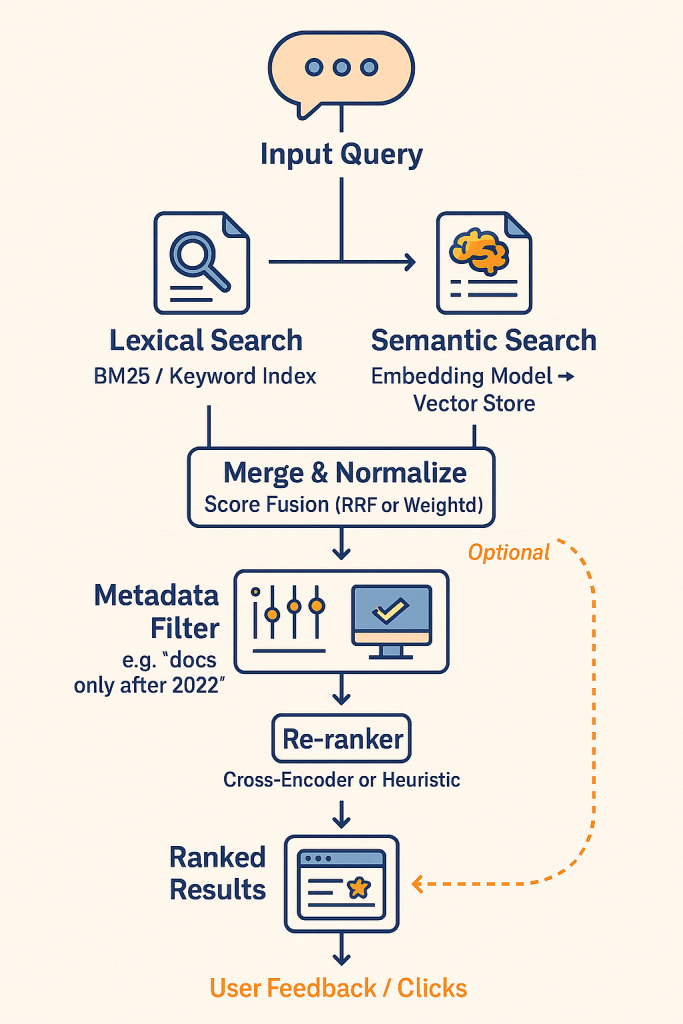
- Hybrid Search: Employs a hybrid search approach that combines modern vector search with traditional keyword-based search to enhance accuracy and handle diverse query types.
- Graph-Enhanced RAG: Incorporates graph-based retrieval mechanisms to understand the relationships between different parts of a document, providing more contextually relevant answers.
Well-Suited For: Organizations whose primary challenge is extracting knowledge from large volumes of complex, poorly structured, or scanned documents (e.g., in finance, legal, and engineering).
🌐 TrustGraph: The Enterprise GraphRAG Intelligence Platform
Product Overview: TrustGraph is an open-source platform engineered for building enterprise-grade AI applications that demand deep contextual reasoning. It moves “Beyond Basic RAG” by embracing a more advanced GraphRAG architecture.
Architectural Approach:
- GraphRAG Engine: Automates the process of building a knowledge graph from ingested data, identifying entities and their relationships. This enables multi-hop reasoning that traditional RAG cannot perform.
- Asynchronous Pub/Sub Backbone: Built on Apache Pulsar, ensuring reliability, fault tolerance, and scalability for demanding enterprise environments.
- Reusable Knowledge Packages: Stores the processed graph structure and vector embeddings in modular packages, so the computationally expensive data structuring is only performed once.
Well-Suited For: Sophisticated technology teams in complex, regulated industries (e.g., finance, national security, scientific research) needing high-accuracy, explainable AI that can reason over vast, interconnected datasets.
Platform Comparison
The choice between a commercial and open-source platform depends on your organization’s priorities. Here is a comparison grouped by key evaluation criteria.
| Platform | Focus | Deployment | Best For | Pricing |
|---|---|---|---|---|
| Vectara | 🎯 Accuracy | ☁️ Cloud | Enterprise | 💵 Subscription |
| Nuclia | 🛡️ Security | 🏢 On-Premise | Regulated | 💵 Subscription |
| Ragie | 🚀 Speed | ☁️ Cloud | Startups | 💵 Subscription |
| Ragu AI | 🛠️ Control | 🧩 BYOC | Experts | 💵 Subscription |
| Dify.ai | 🎨 Visual Dev | ☁️/🏢 Hybrid | All Teams | 🎁 Freemium |
| RAGFlow | 📄 Doc Parsing | 🏢 Self-Hosted | Data-Heavy | 🆓 Open Source |
| TrustGraph | 🌐 GraphRAG | 🏢 Self-Hosted | Researchers | 🆓 Open Source |
Conclusion: A Spectrum of Choice in a Maturing Market
The “build vs. buy” decision for RAG infrastructure has evolved into a more nuanced “build vs. buy vs. adapt” framework. The availability of mature RaaS platforms and powerful open-source alternatives means that building from scratch is often no longer the most efficient path.
The current landscape reflects the diverse needs of the market. The choice is no longer simply whether to buy, but which service philosophy—or open-source architecture—best aligns with a project’s specific goals. Whether the priority is out-of-the-box accuracy, absolute data security, rapid development, or deep architectural control, there is a solution available. This variety empowers teams to select a platform that lets them move beyond infrastructure challenges and focus on creating innovative, data-driven applications that unlock the true value of their knowledge.

 Tellian